Offline Mode & Sync
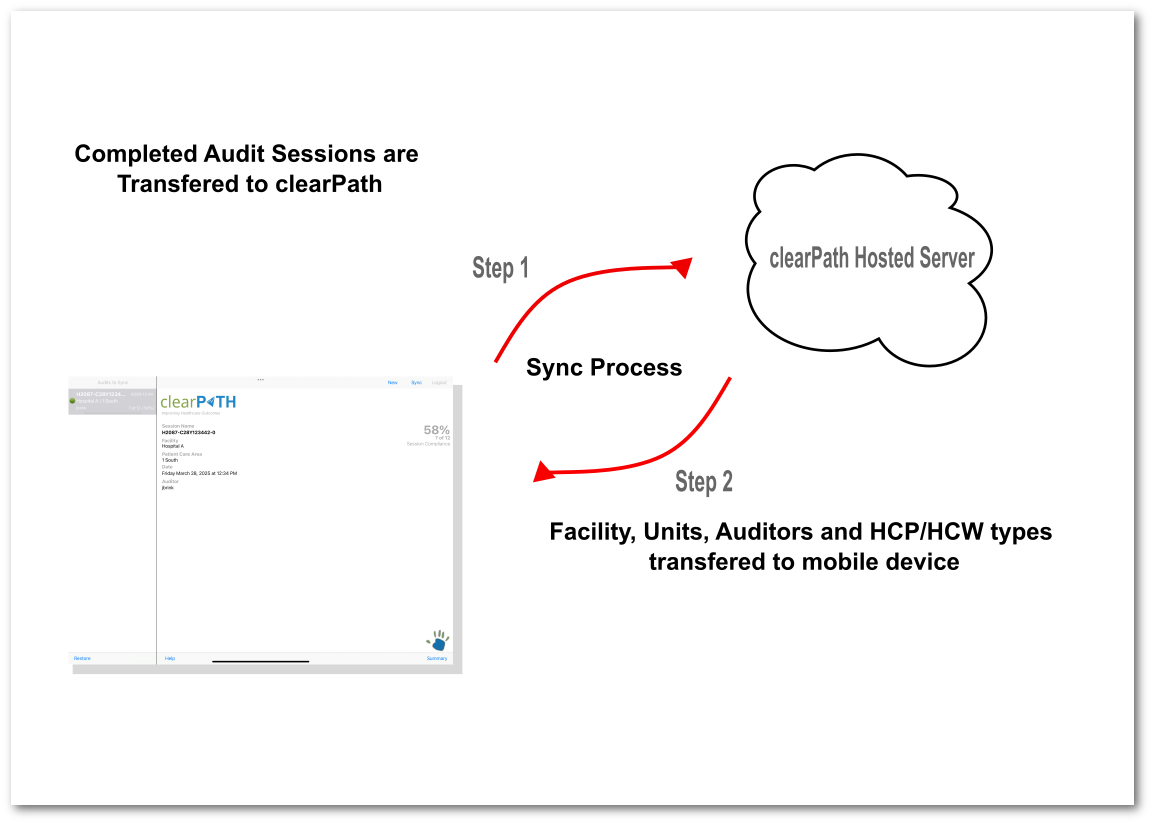
Hospitals have dead zones. Stairwells, basements, and shielded clinical areas all conspire to drop the signal at the moment an auditor is trying to record an observation. clearPath assumes that and keeps working anyway. Every clearPath auditing client — iOS, Android, Windows, and the PWA — stores audits locally on the device and pushes them up to the server automatically when connectivity returns.
The result is a workflow auditors can trust. They never have to remember whether the upload succeeded, never have to retype an observation, and never have to skip a moment because the wifi dropped. The sync screen tells them exactly how many audits are pending and confirms the moment each one lands on the server.
Request for Information Compare EditionsKey Benefits
- Audit even with no signal
- Local storage on every device
- Automatic background sync
- Pending-audit indicator on the home screen
- No lost observations from dead zones
- Works on iOS, Android, Windows, and PWA
- Conflict-free server merge
- Survives device restarts and app reloads
How Sync Works
Every audit completed offline gets a unique device-side identifier and an encrypted local record. As soon as the device sees a working network connection, clearPath uploads the queued audits in the background, in the order they were collected. The auditor sees a clear pending-audit count until everything is uploaded; the server timestamps each session at upload and reconciles it against the auditor, facility, and unit it was recorded against.
- Pending-audit count visible on the home screen
- Background upload — auditor doesn't have to wait
- Original observation timestamps preserved
- Encrypted at rest on the device
- Tamper-evident record of when each audit synced
Audit Anywhere. Sync Later.
Available on every clearPath edition. Offline auditing is included at no additional cost in iOS, Android, Windows, and the PWA.
Request for Information Compare Editions