Report Builder
Sometimes the report you need is not on the list. The Report Builder lets you design your own. Pick the information you want, choose the columns, add an optional chart, and lay out a header and footer — all while a live preview redraws beside you. When you save, your report joins the rest: it refreshes overnight, runs on demand, and can be emailed or bundled into a distribution list just like any built-in report.
There is nothing to install and no query language to learn. You point, you click, and you see exactly what the finished report will look like before you ever save it.
Request for Information Compare EditionsKey Benefits
- Design reports without writing code
- Live preview as you build
- Ready-made, safe data sources
- Pick, reorder, and align columns
- Filter and multi-column sort
- Subtotal and grand-total rows
- Colour-code by your account ranges
- Group rows under headings
- Bar, line, or pie chart with axis labels
- Three-section header and footer
- PDF, HTML, CSV, Excel, or Word
- Print-ready — headings repeat every page
- Settings summary at the end of the report
- Schedule and distribute like any report
Design on the Left, Preview on the Right
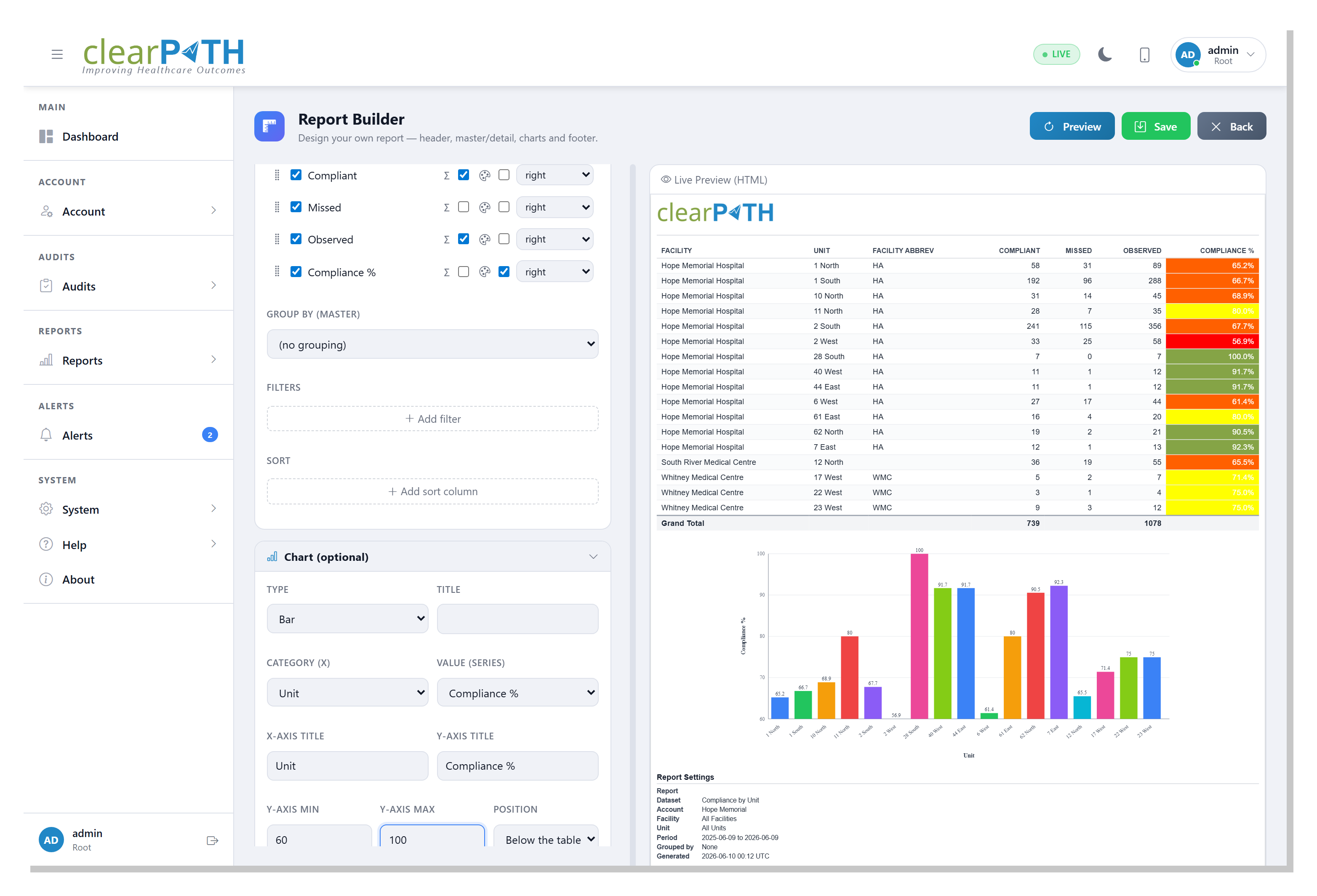
The builder splits the screen in two. On the left are the design panels — General, Scope & Period, Header, Data, Chart, and Footer — each one collapsible so you can focus on a single part at a time. On the right is a live preview that re-draws with every change and scales to fit, so a full page is always shown without a sideways scroll. Drag the divider to give the design panels or the preview more room.
- Collapsible design panels
- Live, always-current preview that fits the page
- Resizable layout — drag the divider
- Landscape or portrait; PDF, HTML, CSV, Excel, or Word
- Dynamic time periods such as Last 12 Months
Safe, Ready-Made Data Sources
You start from a dataset — a ready-made view of your own data. There are more than two dozen to choose from, and each one offers a fixed set of fields, so sensitive information such as passwords and security keys is never exposed. Tick the columns you want, drag them into order, set their alignment, and optionally group the rows under headings (for example, units grouped by facility).
- Compliance by unit, facility, month, Moment, or provider
- Technique distribution and PPE / attribute distribution
- Observer summary and daily observation volume
- Audit sessions, session completeness, and observation detail
- Audit schedules, compliance targets, and inter-rater reliability
- Custom audit results, scores, and category scores
- Users, roles, facilities, units, and providers
- Auditing devices, alerts, distribution lists, and defined reports
- Observation, scratch-pad, and session comments
Filter, Sort & Total
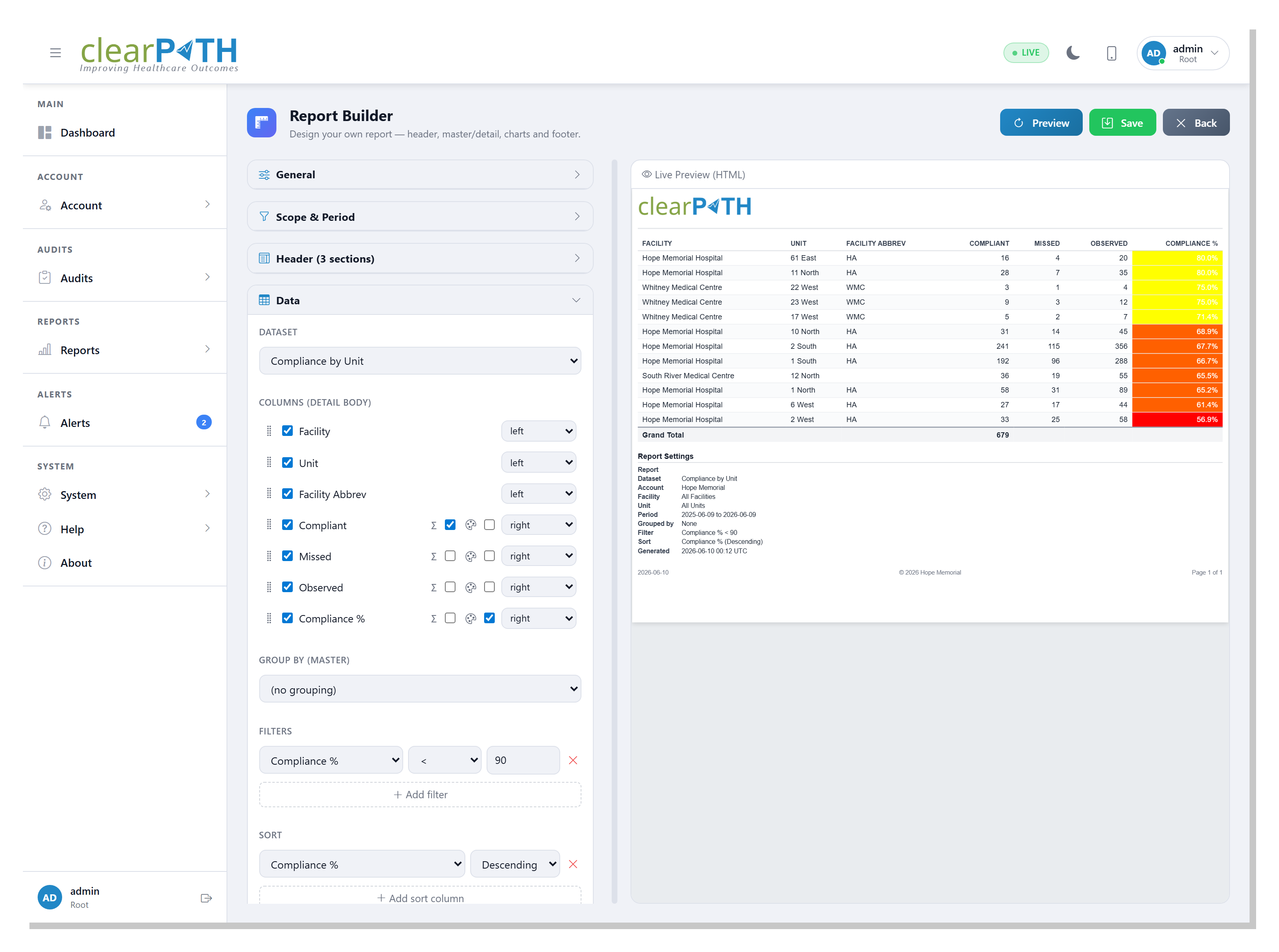
Narrow a report to exactly what matters. Add filters such as compliance below 90% or provider is Nurse, and sort by one column or several. Turn on totals to add a grand-total row, and a subtotal under each group when you group the rows. The same filters apply to the chart, so the graph and the table always agree.
- Field filters with simple operators
- Multi-column sorting
- Grand-total and per-group subtotal rows
- Filters carry through to the chart
Colour the Numbers
Switch on colour for any number column and its cells are shaded by your account's colour ranges — the same green / amber / red bands you see on the dashboard. A compliance column reads at a glance: strong results in green, weak ones in red, consistent with the rest of clearPath.
- One-click colour on any number column
- Uses your account's colour ranges
- Consistent with the dashboard
- Works in PDF, HTML, Excel, and Word
Headers, Charts & Footers
Every report can carry a three-section header and footer. Type any text, drop in tokens that fill themselves in — the report name, your account name, the facility, the date — and switch on your account logo. Add a bar, line, or pie chart above or below the table, give it axis titles and a fixed value range, and finish the footer with a date, a copyright line, and an automatic Page X of Y counter.
- Three-section header and footer
- Auto-filled tokens (name, date, facility…)
- Your account logo in the header
- Bar, line, or pie chart, above or below the table
- Axis titles and a fixed value-axis range
- Date, copyright, and Page X of Y footer
Saved Reports Behave Like Any Other
A report you build is a first-class report. It appears on your Reports list, refreshes on the normal overnight schedule, can be run on demand, and can be added to a distribution list for automatic email or file delivery — and you can re-open it in the builder any time to refine it.
- Listed and managed with all your reports
- Automatic overnight refresh
- Refreshes the moment you save
- Email and file distribution
- Re-open and edit in the builder
Print-Ready, Page After Page
PDF and Excel reports are laid out for printing. The logo, header, column headings, and footer repeat at the top and bottom of every page, the table is sized to fill the width of the page, and when you group the rows each group starts on a fresh page — so a long report reads cleanly from the first page to the last.
- Logo, header, and footer on every page
- Column headings repeat on each page
- Table fills the width of the page
- Each group starts on a new page
- Automatic Page X of Y
A Settings Summary on Every Report
Each report can finish with a tidy settings summary — the data source, the account, facility, and unit it covers, the time period, every filter and sort, and how the rows are grouped. Whoever receives the report gets a clear record of exactly what it shows. And because a report refreshes the moment you save it, the file is always current in the format you chose.
- Records the report's data source and scope
- Lists the period, filters, sort, and grouping
- Optional — turn it off with one click
- Always up to date in your chosen format
Your Data, Your Layout.
The Report Builder is available on the clearPath Ultimate edition.
Request for Information Compare Editions