Direct Observation
Direct observation is the core of clearPath. Auditors capture WHO Five Moments observations the instant they happen — on a phone, tablet, PC, or directly in the browser — and every observation lands in the same Audit Sessions list, the same dashboards, and the same reports as the rest of your data.
No paper forms, no transcription, no overnight batch. Sessions are time-stamped, attributed to the auditor, and ready for review the moment the auditor taps Stop. clearPath runs on Windows, macOS, iPad, iPhone, Android, and any modern web browser.
Request for Information Compare EditionsKey Benefits
- No paper forms required
- Real-time data capture
- Eliminates transcription errors
- Works offline with auto-sync
- Immediate result availability
- Mobile and browser observers
- Per-observation indicators, type, and attributes
- Automatic session naming and attribution
- Backdating from paper supported
- Consistent across every supported platform
Audit Sessions
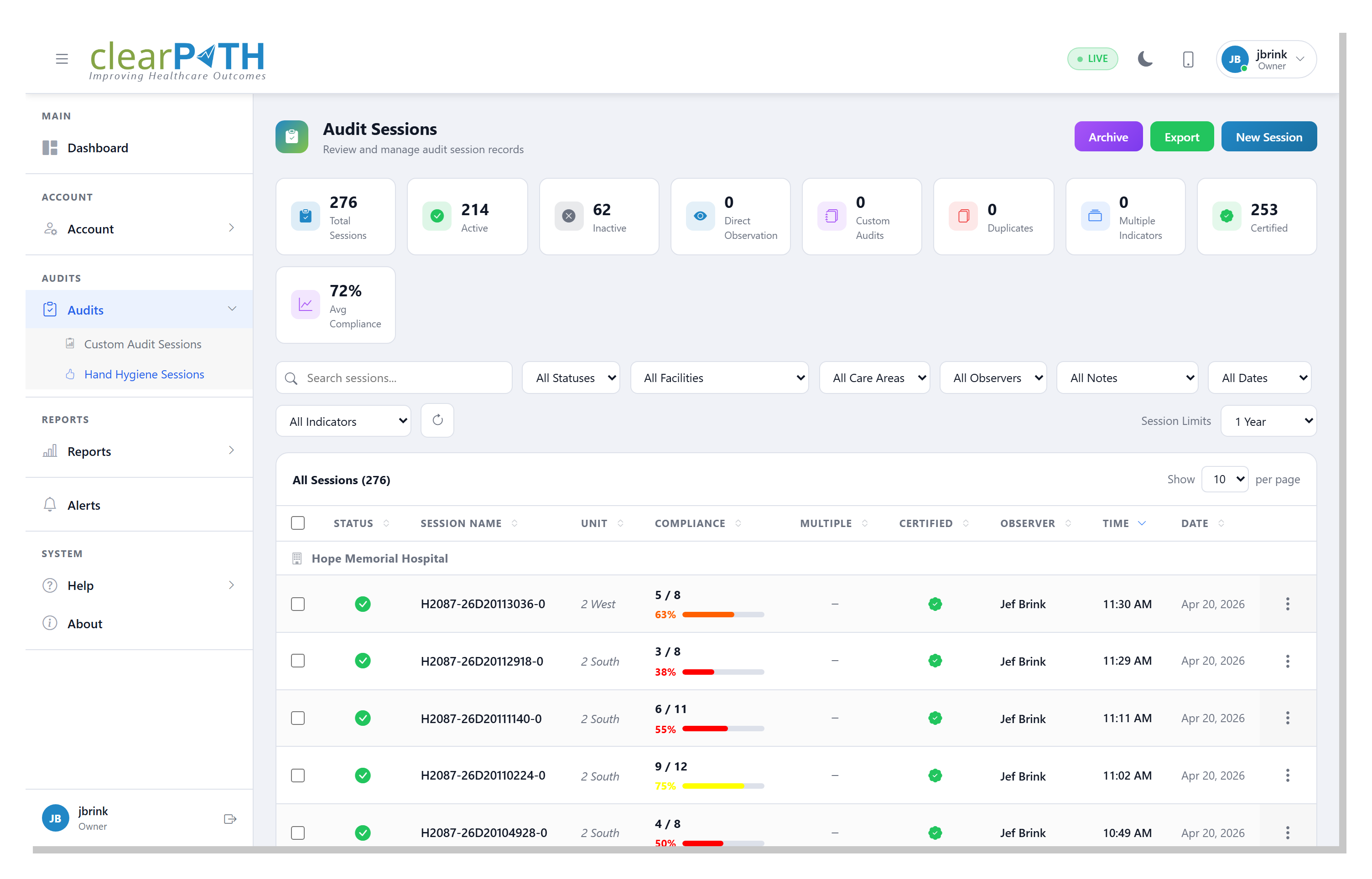
Every direct observation audit lands in the Audit Sessions list as a time-stamped record. Stat chips across the top roll up totals, active vs. inactive, direct observation vs. custom audit, duplicates, multiple-indicator sessions, certified observers, and average compliance — all reflecting your current filters.
- Filter by status, facility, care area, observer, notes, date, indicators
- Toggle a session active or inactive with one click
- Edit observation details, edit results, or open the audit summary
- Bulk archive or delete from the selection bar
- Export to HTML, CSV, or Excel
- Quick visual cues for notes, certification, and multiple indicators
Audit in the Browser
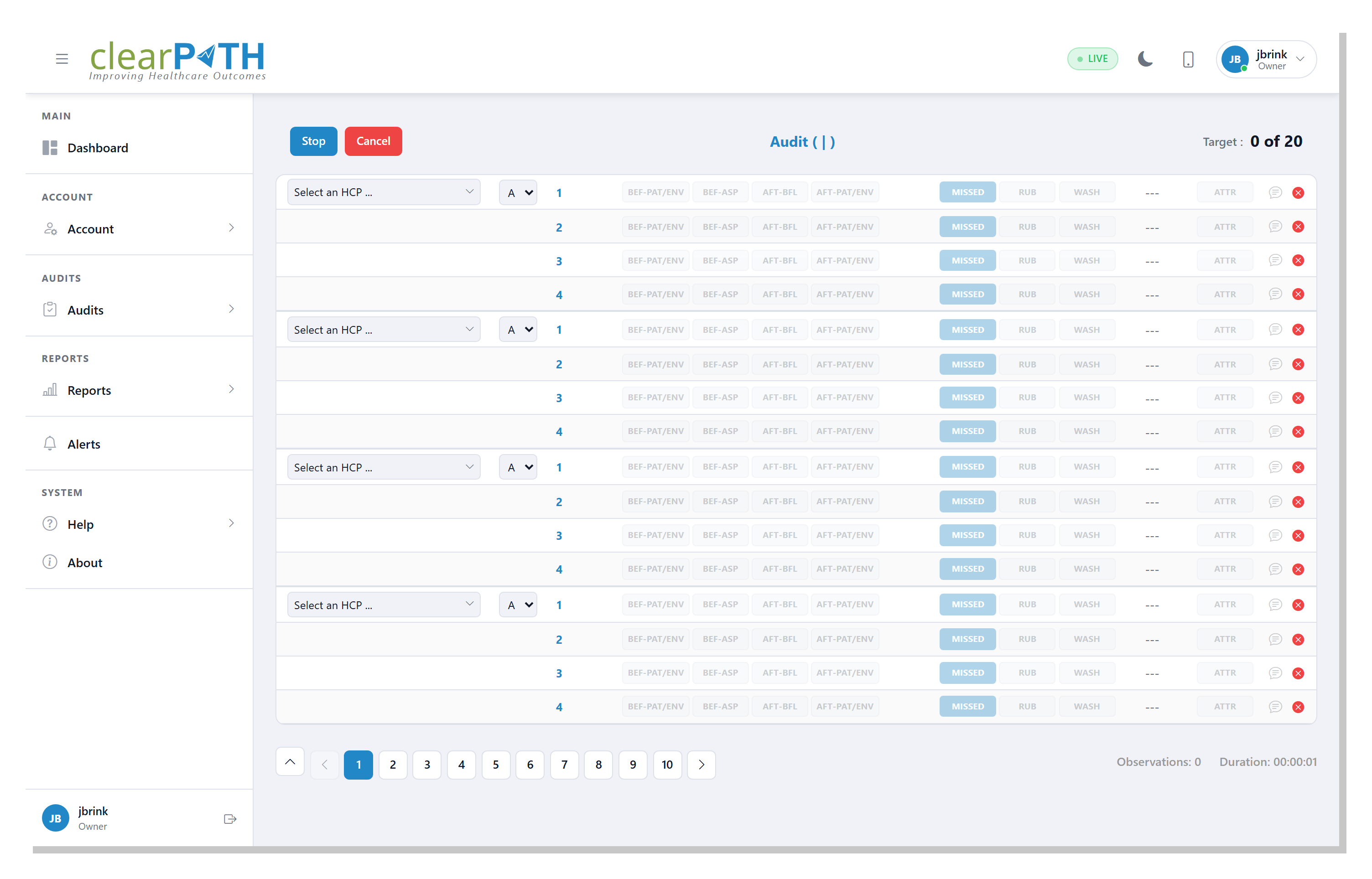
The web observer lets an auditor run a live hand hygiene session straight from clearPath — no separate app required. Pick the healthcare provider, toggle the indicator, the technique (RUB or WASH), and any attributes (gloves, nails, bracelets, rings) as the moment happens.
- Browser-based — no install required
- Per-observation HCP, indicator, type, and attribute toggles
- Running observation count against the session target
- Add observation-level and session-level notes
- Pagination once a session grows long
- Auto-restore in-progress observations after a disconnect
Edit Session Results
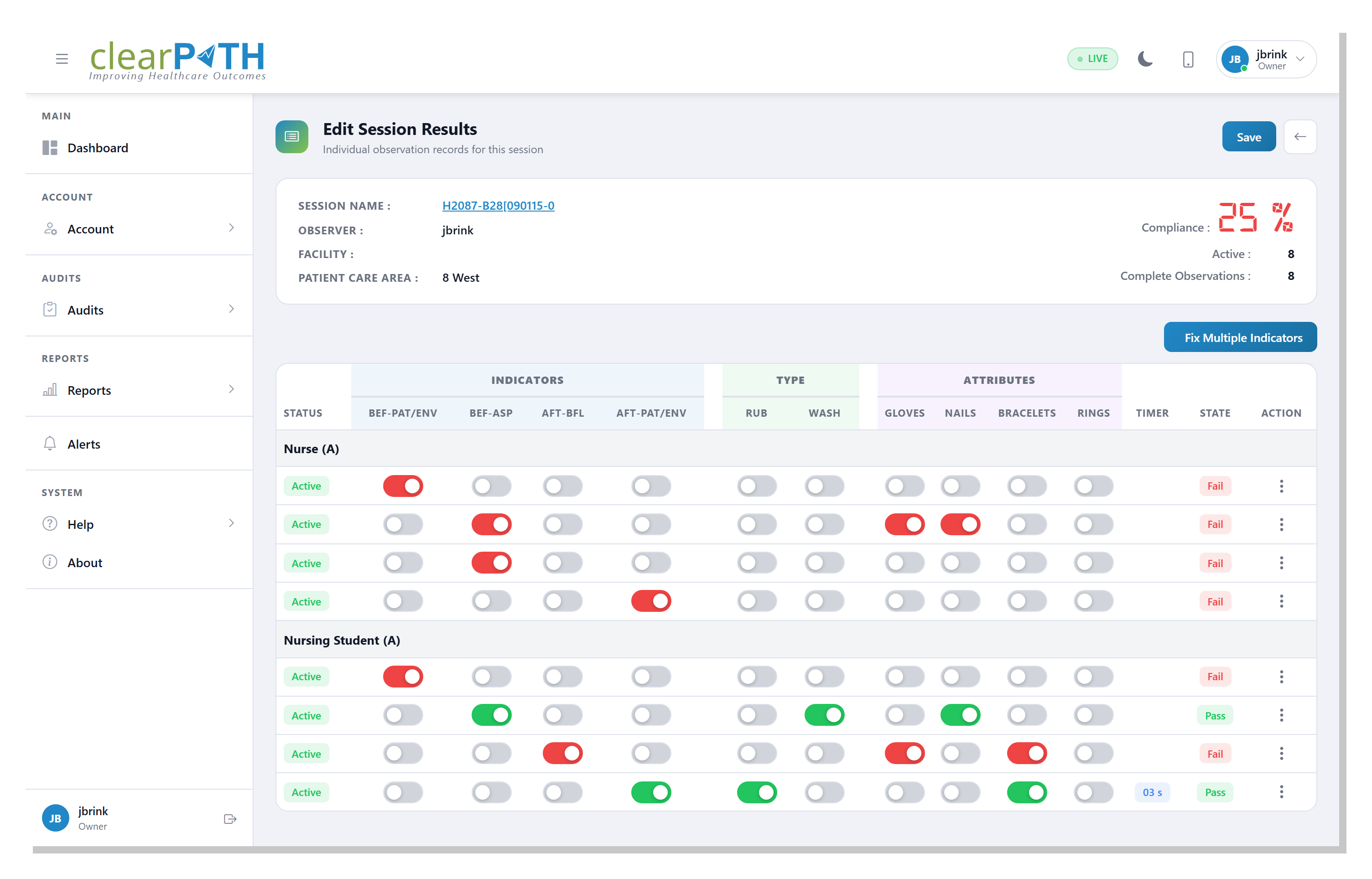
Open any session to see every observation recorded, grouped by healthcare provider type. Indicators, technique, and attributes are individual toggles — flip one to correct a mistake and the header compliance percentage recalculates instantly.
- Per-observation indicator, type, and attribute editing
- Live compliance recalculation as you correct values
- Pass / Fail state shown per observation
- Fix Multiple Indicators walks through flagged observations
- Save edits or back out to discard
Audit Summary
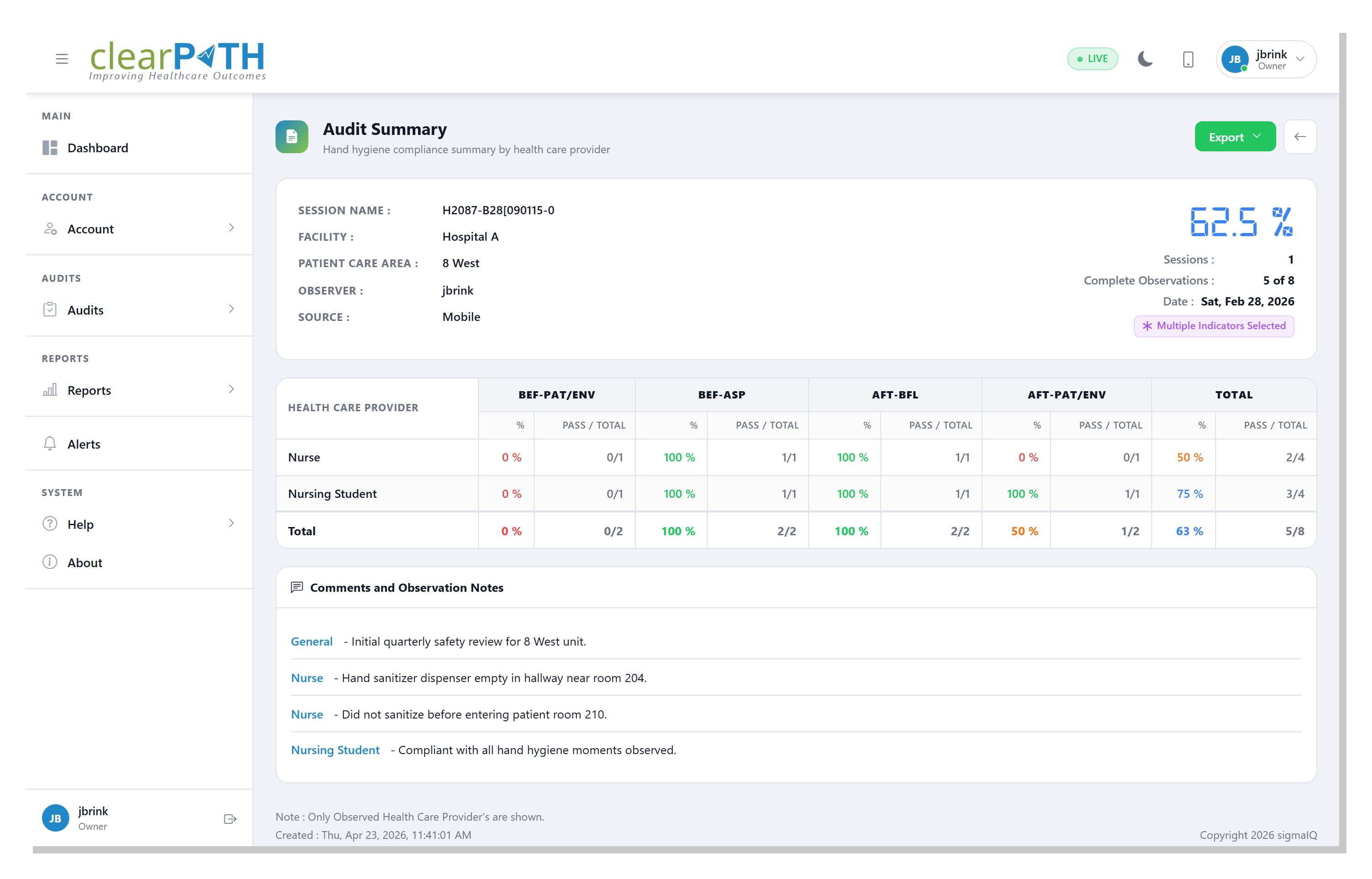
The Audit Summary is the report-ready view of a session — a single page showing compliance broken down by healthcare provider type and by moment, plus the comments and observation notes attached to the session. Export as PDF or email it directly to one or more recipients.
- Pass / total and percentage per provider type, per moment
- Color-coded compliance matrix
- Comments and observation notes grouped by provider
- Multiple Indicators badge when present
- One-click PDF export
- Email Audit Summary with custom subject and body
Live Dashboard
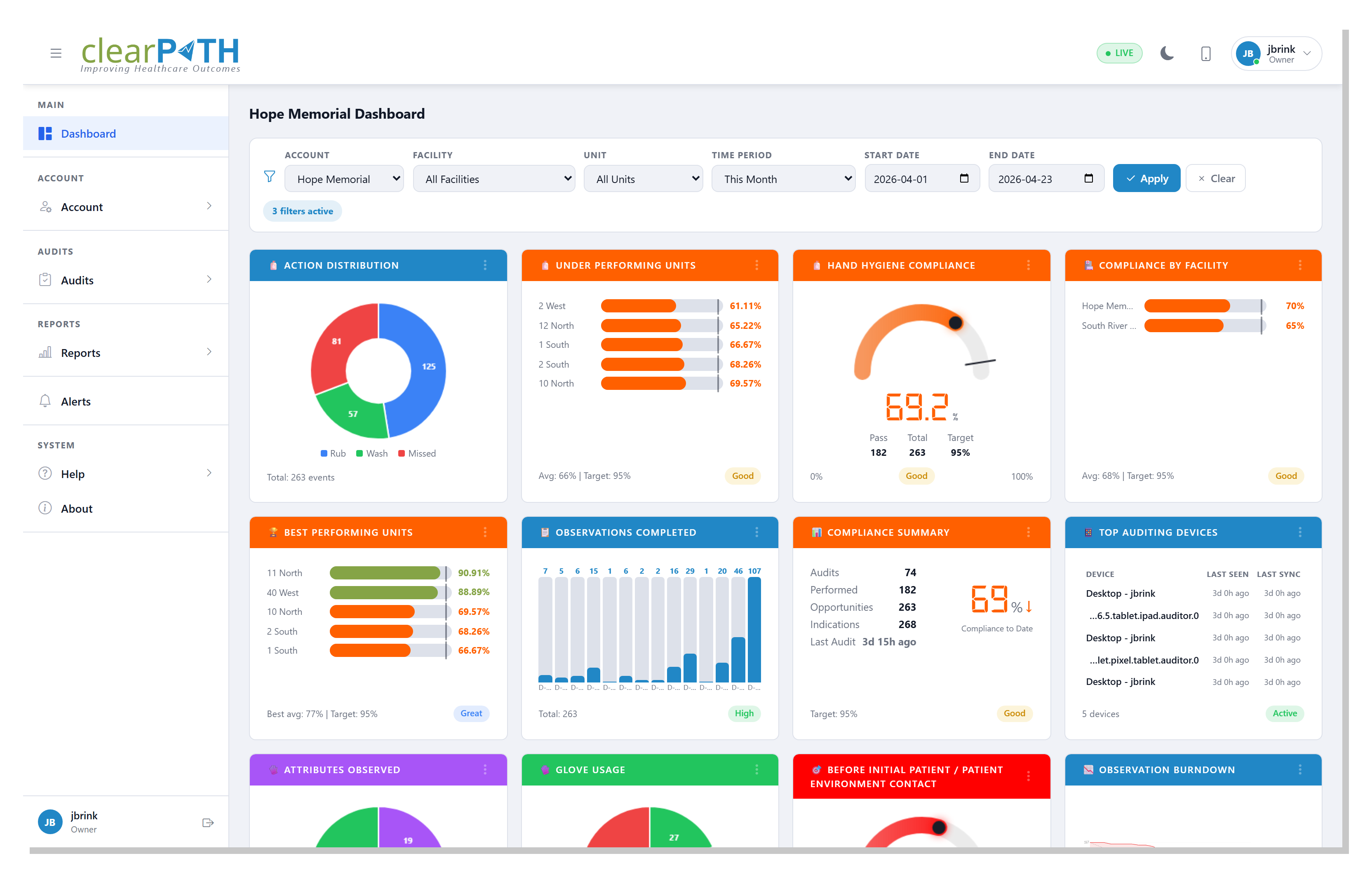
The dashboard is the landing page after sign-in — a live, at-a-glance view of compliance across the organization. Every widget refreshes as new observations come in, and the filter bar scopes every widget at once by account, facility, unit, and time period.
- Drag-and-drop widgets across the grid
- Hygiene, Compliance, Audits, Devices, Moments, Charts, Custom Audits, Challenges
- Status badges: Live, Today, Month, 12 mo, All
- Filter by account, facility, unit, time period, or custom range
- Layout, widgets, and filters saved per user
- Compare current period against the previous one
Floor Plan View
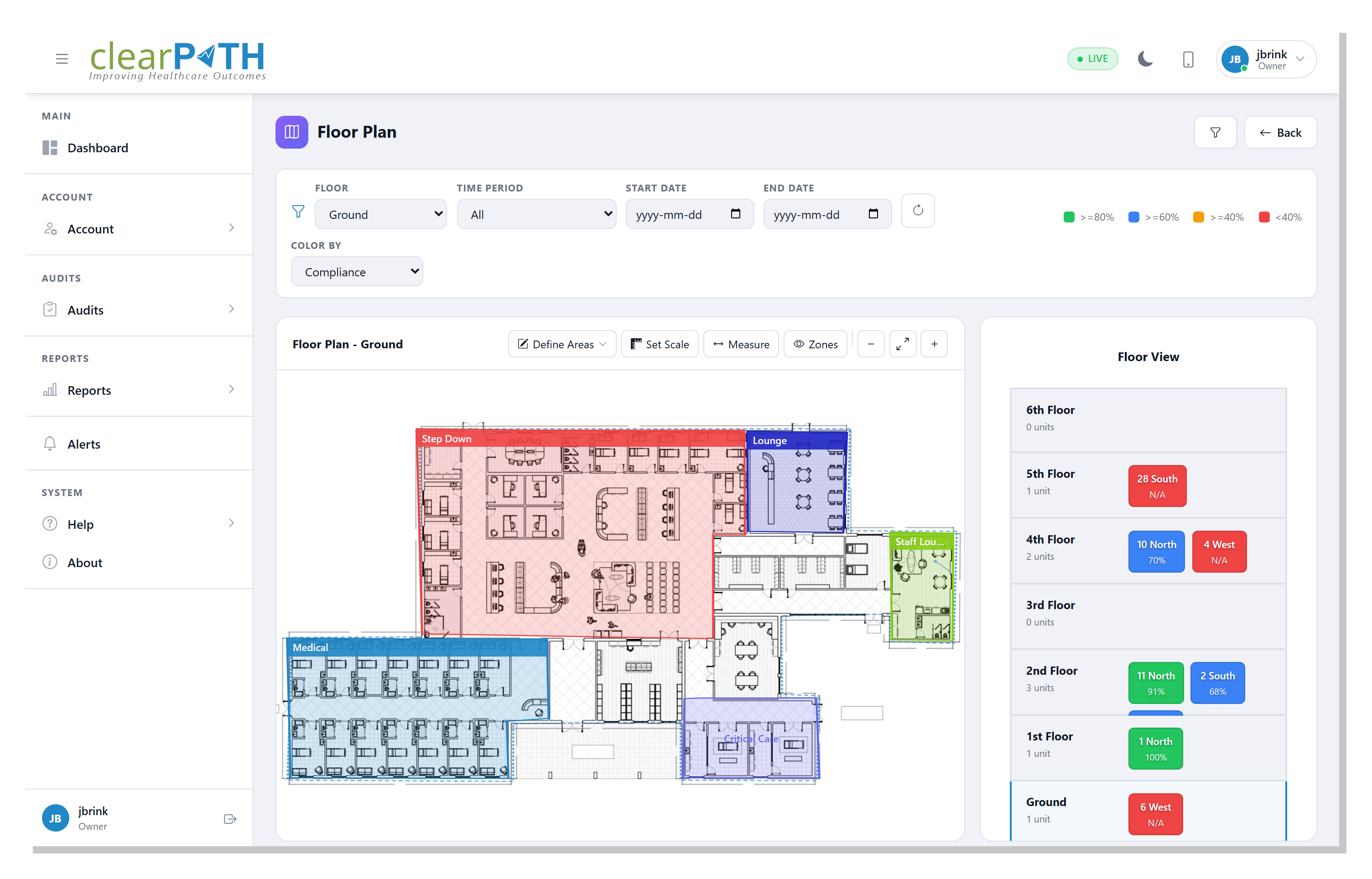
Upload a floor plan image, draw the wards and corridors, and clearPath overlays compliance directly onto the building layout. The Floor View panel on the right lists every floor and unit so you can jump between levels and see results in physical context.
- Custom or standard floor plan layouts
- Define areas, set scale, measure, and zone tools
- Color-by compliance with thresholds (≥95, 80–94, 70–79, <70)
- Filter overlays by time period and date range
- Floor View panel for quick navigation between levels
- Per-unit compliance chips on the side panel
Visual Map
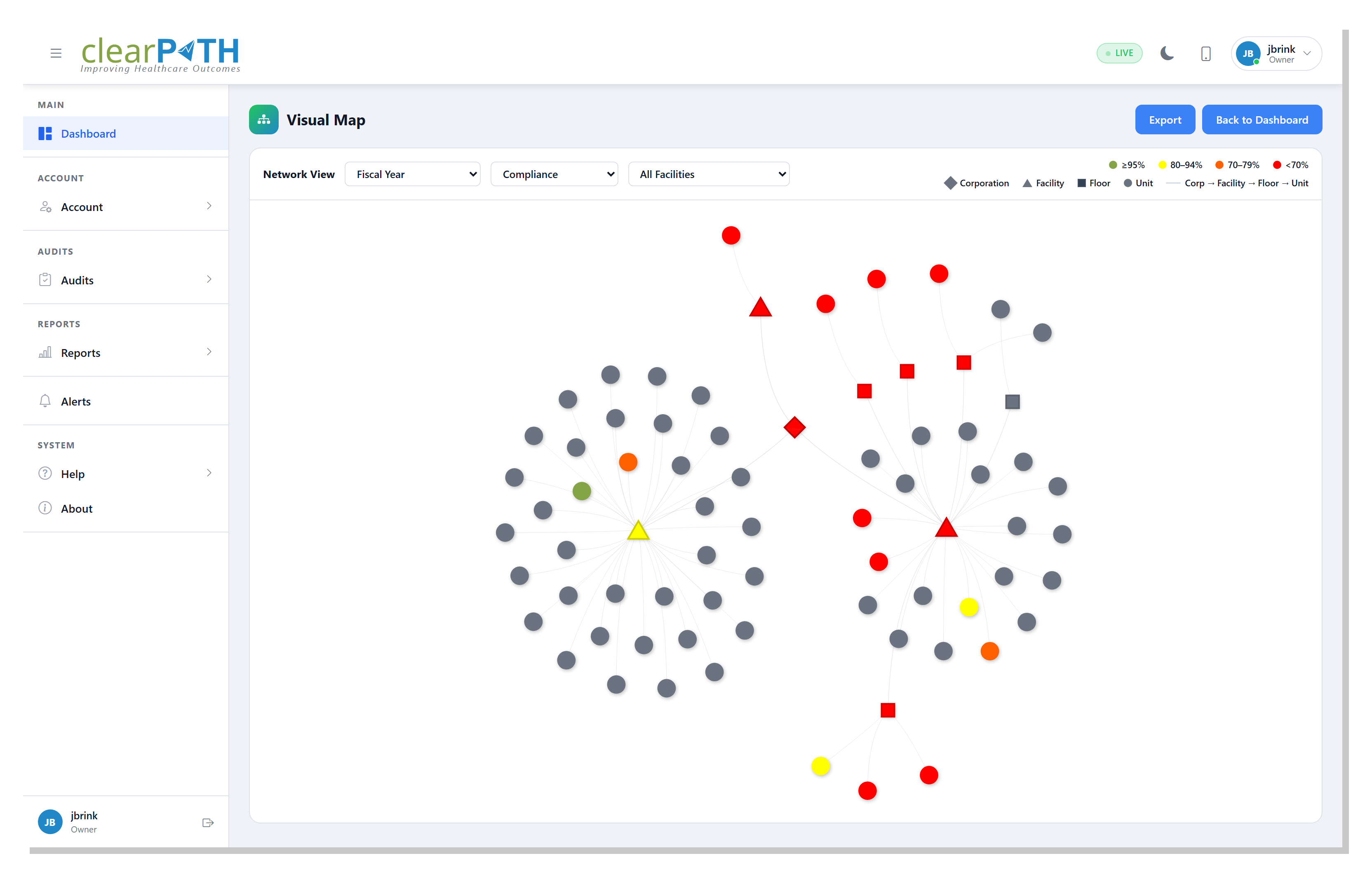
The Visual Map plots your entire organization as a network — corporation, facilities, floors, and units — colored by compliance. It is the fastest way to see which corner of the organization is trending below target and where to drill in.
- Network view of corporation → facility → floor → unit
- Color-coded compliance thresholds
- Distinct shapes for facilities, floors, and units
- Filter by fiscal year, compliance, and facility
- Export the current view
Audit Devices
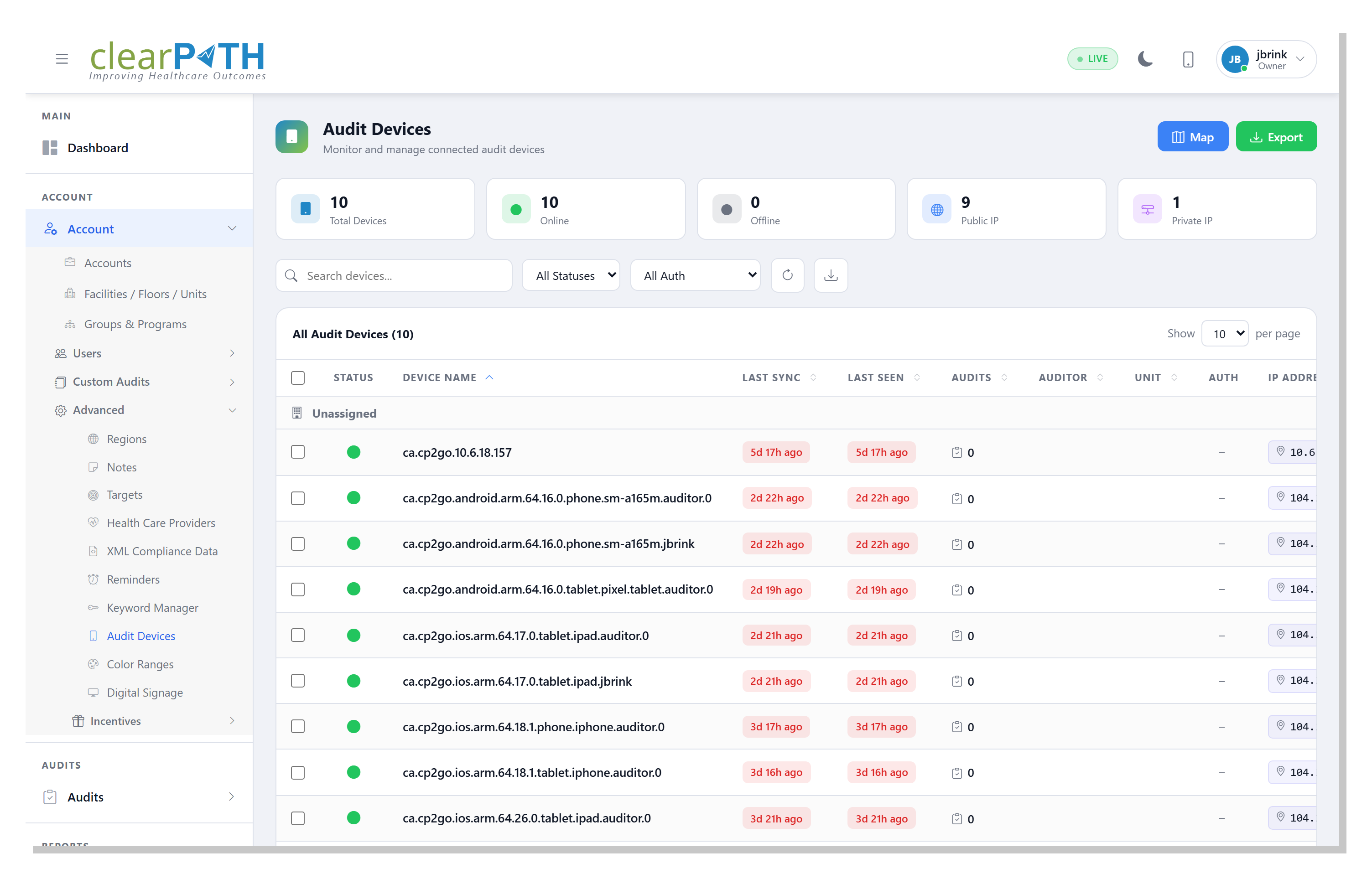
Every phone, tablet, or PC running the clearPath observer registers itself as an audit device. The Audit Devices page shows which devices are connected, who is using them, when they last synced, and where they last phoned home from — and it is where you approve a new device the first time it connects.
- Online / offline status at a glance
- Last sync and last seen per device
- Public vs. private IP rollup
- Pending Approval, Approved, Revoked auth states
- Map view plots every device by IP location
- Audits-per-device count and assigned auditor
Import Audits
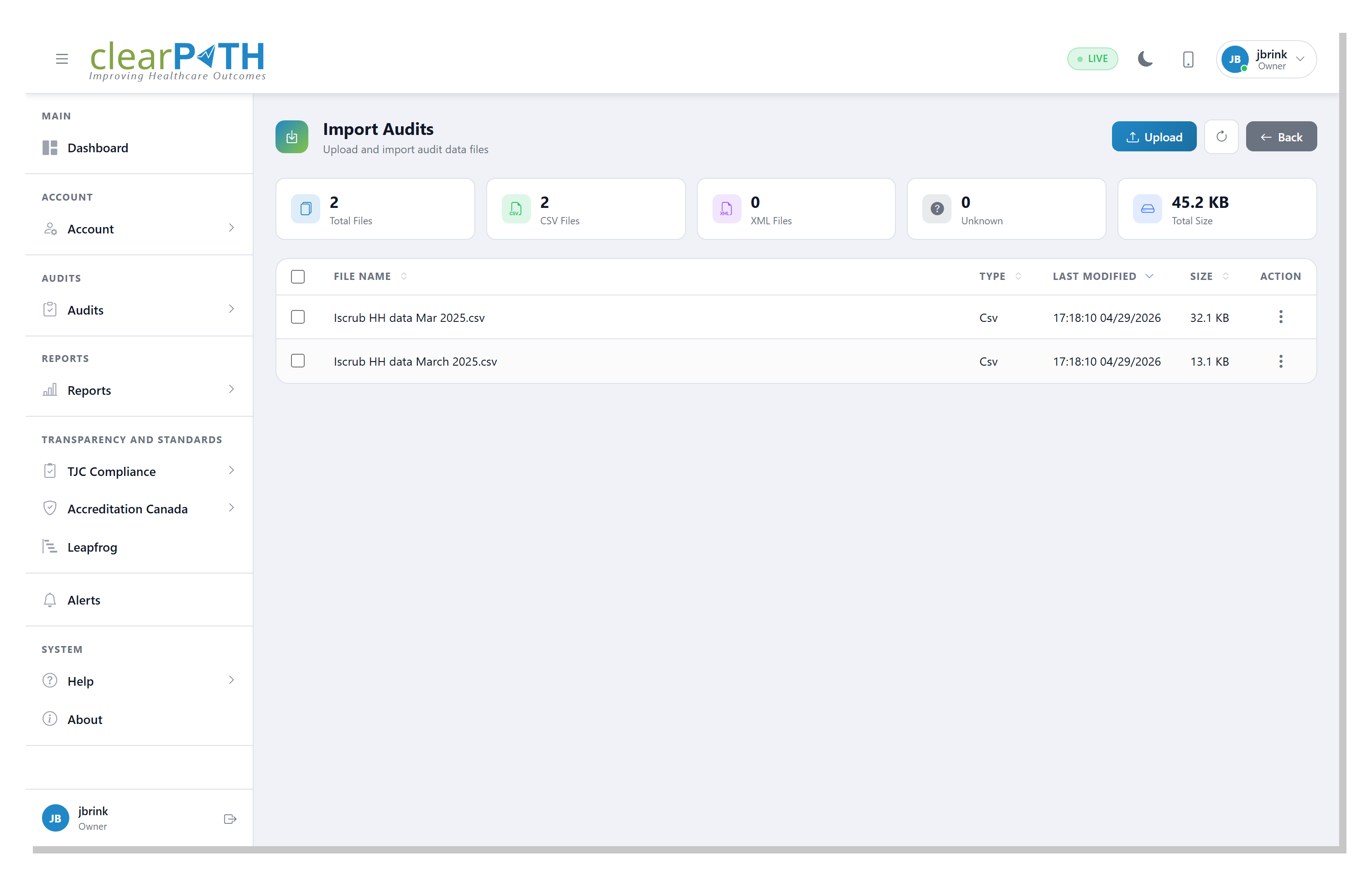
Already collecting observations in another tool? clearPath imports hand hygiene audit data from external sources — a folder of iScrub CSV files or a Ministry of Health CSV export — straight from the browser. Upload the files, review them in the Import Audits workspace, and queue them for import without needing console or file-share access to the server.
- Upload iScrub or Ministry of Health CSV files in the browser
- Stat chips count CSV, XML, and unknown files at a glance
- Queue each file to the right account and file type
- Imported files are renamed so they can't be re-imported by accident
- Bulk-select and delete files you no longer need
Session Transaction Log
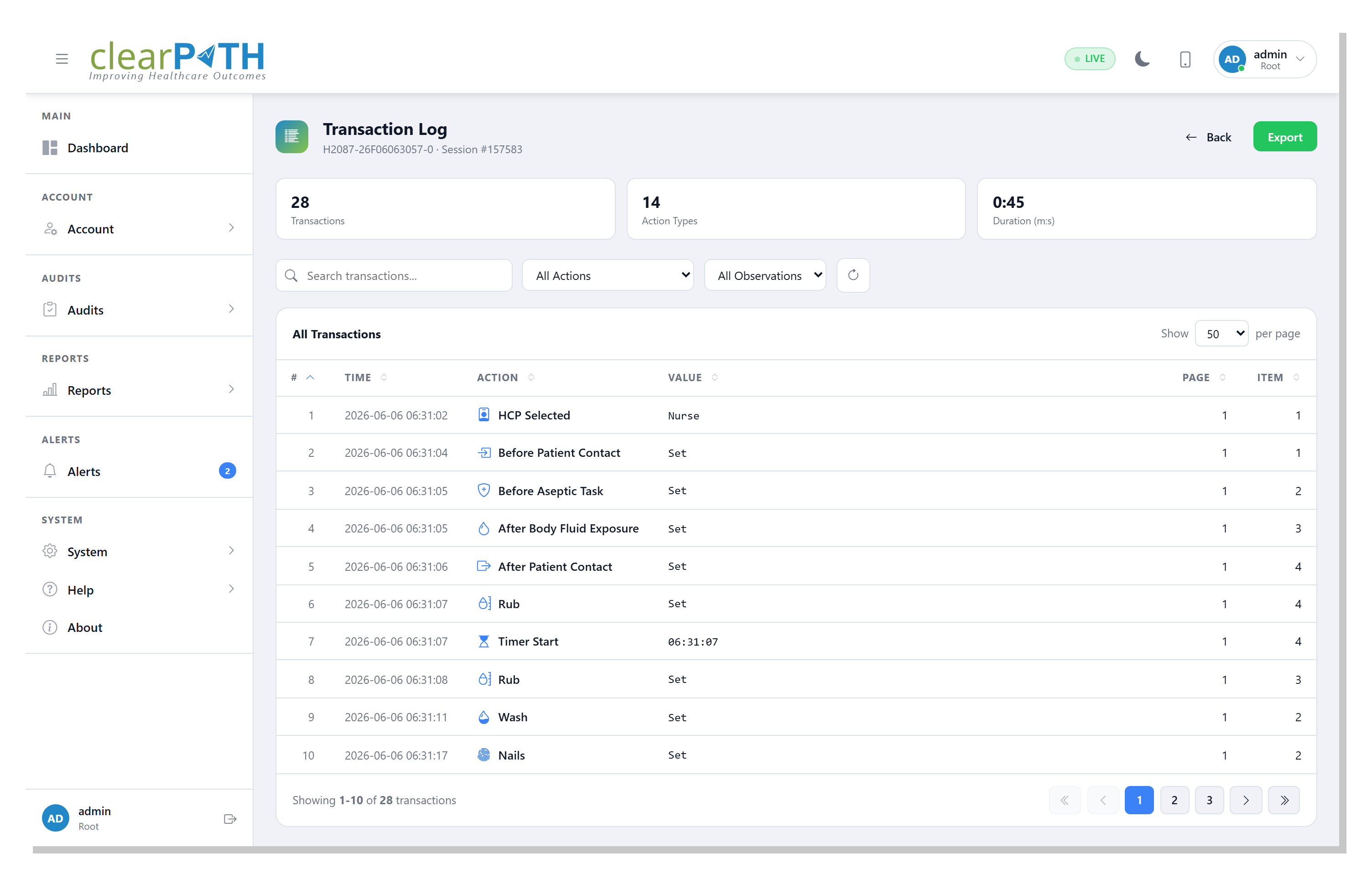
For any session captured on a device, the Transaction Log is a step-by-step record of everything the auditor did — every provider selected, every moment marked, every rub or wash, and every note — in the order it happened. It is the clearest way to understand exactly how a session was captured, or to walk back through the sequence of actions behind a result.
- Every recorded action in sequence, with timestamps
- Search the log, or filter by action type or observation
- Stat chips summarize transactions, action types, and duration
- Sort by any column
- Export to HTML, CSV, or Excel
Replace Your Clipboard. Keep Your Standard.
Bring your existing audit forms — we'll build them into clearPath in one session. WHO Five Moments out of the box, your protocols layered on top, real-time results from the first observation.
Book a Build Session See Custom Audits