Walk Into Your Next Joint Commission Survey With the Data Already in Hand
The Joint Commission's unannounced triennial surveys reward organizations that can produce structured, time-stamped, traceable evidence of sustained compliance — not binders rebuilt the week before the surveyor arrives. clearPath was built around that data discipline from day one.
Joint Commission Readiness layers a complete survey-prep suite on top of the audit data clearPath already collects: a readiness dashboard, the TJC + CMS F-tag template library, one-click evidence packets, PI action plans, tracer methodology, sampling adequacy alerts, and a survey cycle calendar. All shipping today in Enterprise and Ultimate.
Book a Walkthrough Compare EditionsWhy It Matters
- Unannounced surveys on 18–39 month windows
- Sustained-improvement evidence expected (typically 4+ months of trend data)
- SAFER Matrix scoring rewards documented, traceable practice
- ESC and corrective-action documentation must be reproducible
- Sampling adequacy per unit comes up during tracer activity
- Multi-accreditor environments (TJC + state + CMS + DNV/CIHQ) need a single source of truth
What's Included
All live in clearPath Enterprise and Ultimate. Each capability is wired into the audit data and dashboards your team already uses — no new collection workflow, no parallel system.
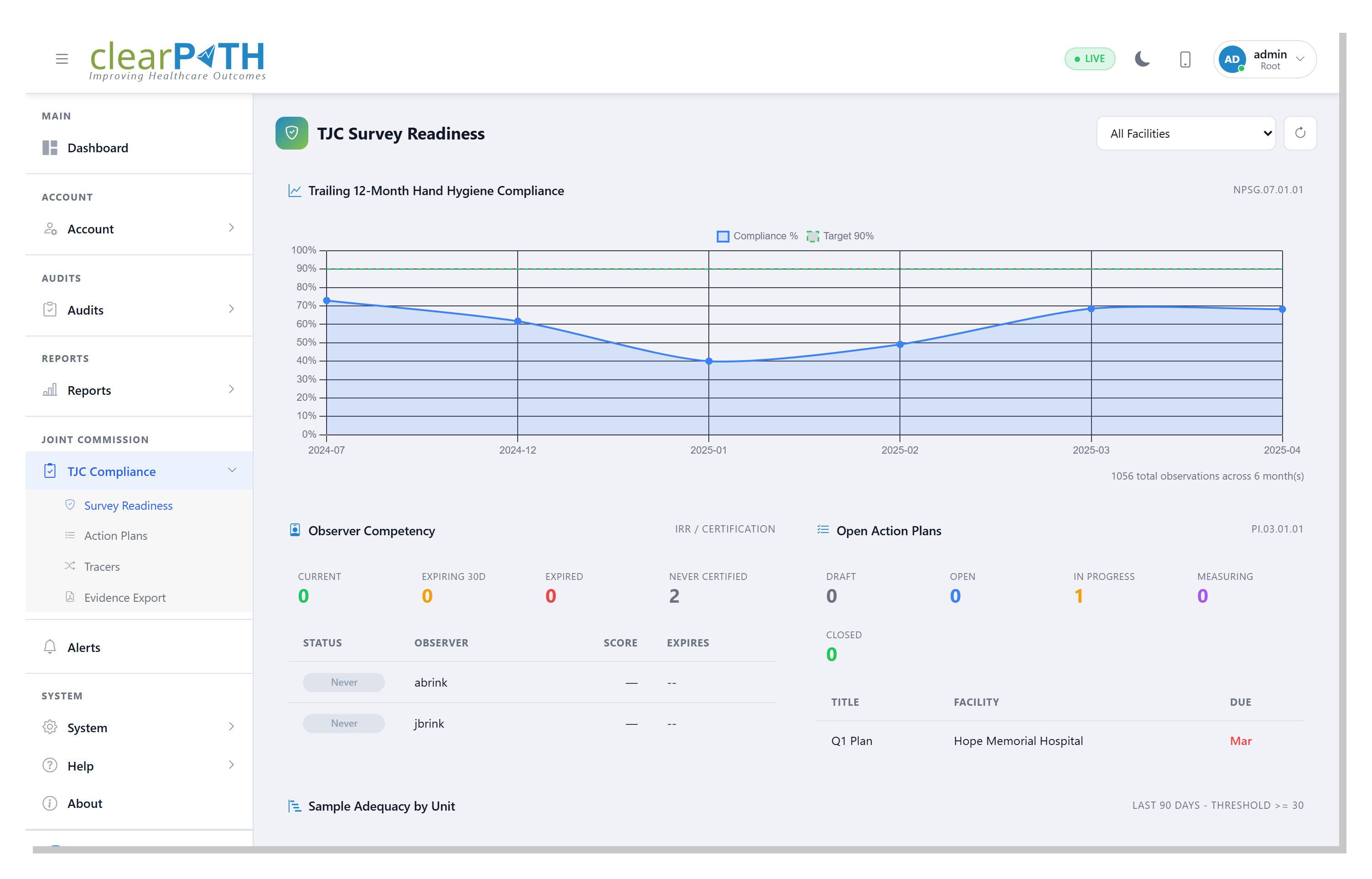
Survey Readiness Dashboard
Per-facility and per-unit gauges show months of sustained compliance, % above threshold, observation volume vs. sampling adequacy, days until your next survey window, and open performance-improvement actions. Drops into the same dashboard grid you already use, scoped by the same facility / unit / time-period filters.
- Sustained-improvement gauge (4+ month trend)
- Sampling adequacy flags per unit
- Survey-window countdown
- Open PI action-plan count
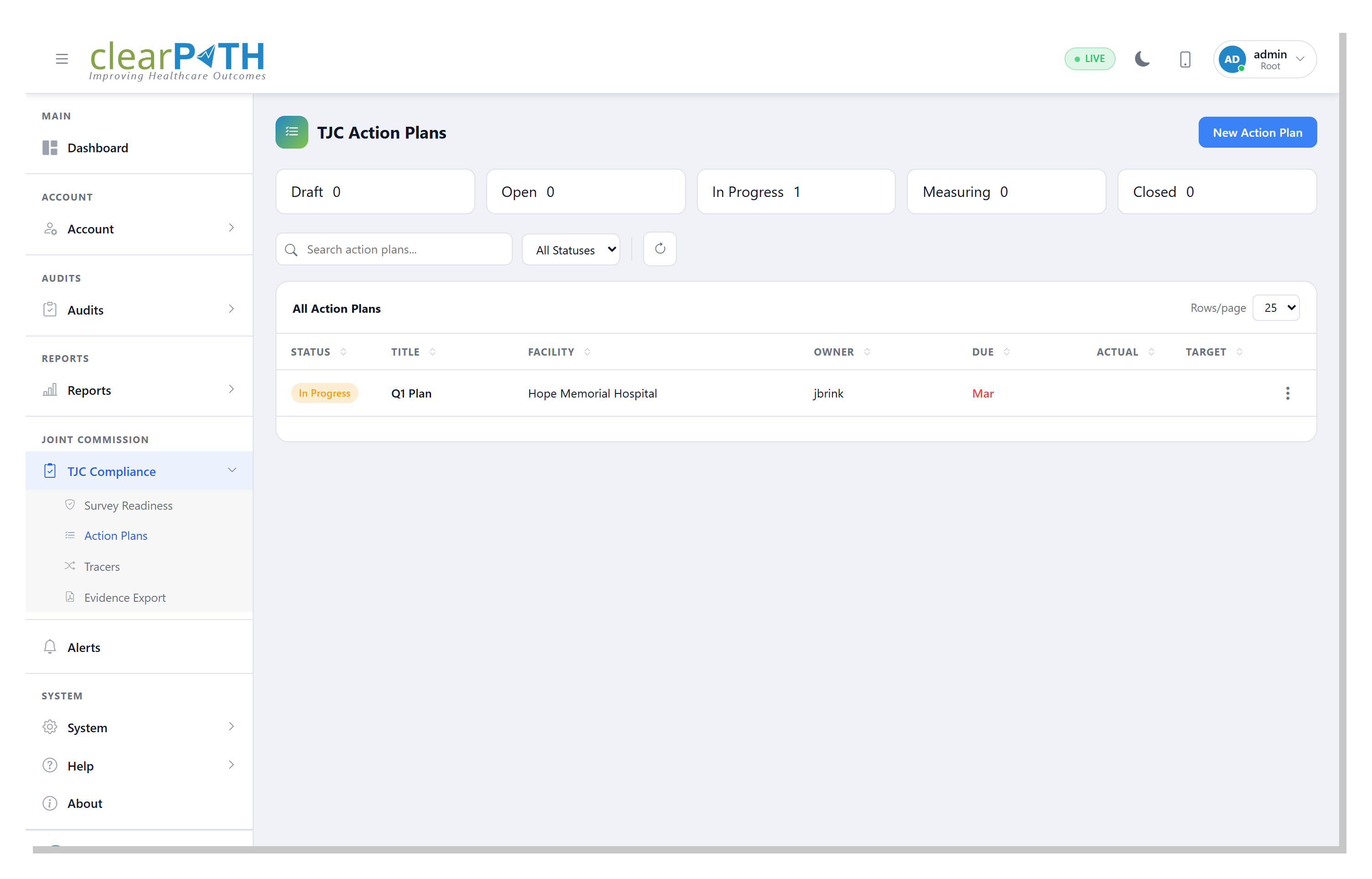
Performance Improvement Action Plans
When a unit drops below threshold, an action item opens automatically. Capture interventions, assign owners, and link the re-audit results that close the loop — mapping cleanly to PI.03.01.01 and LD.03.04.01.
- Auto-create from threshold drops
- Assign owner, target date, intervention type
- Link the re-audit that proves closure
- Status, age, and overdue indicators in the list
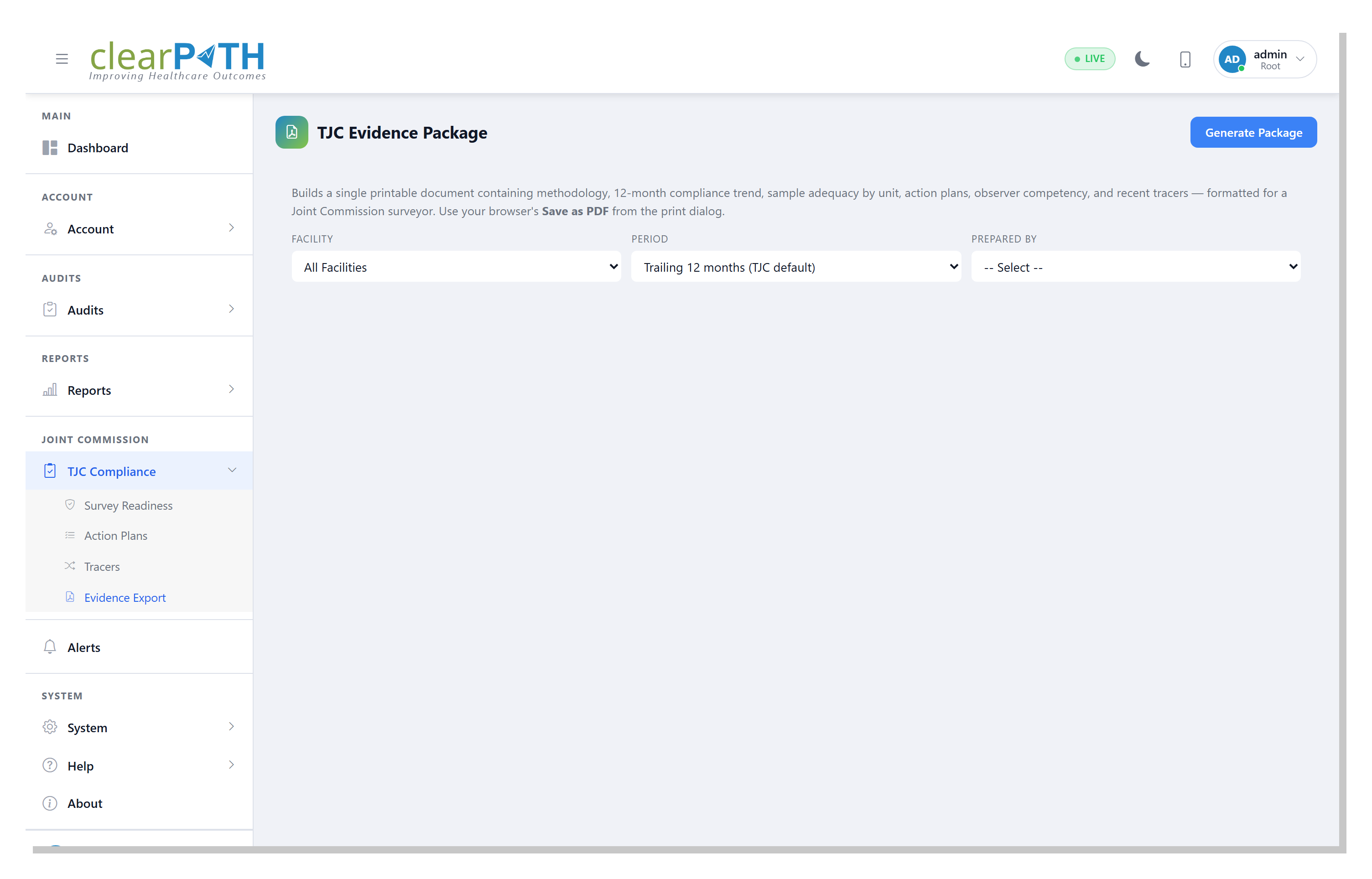
Survey Evidence Packet Generator
One-click PDF or Excel binder for any date range and standard set: compliance trends, sampled observations, action-plan closures, role and permission attestations, and a sampling adequacy summary. Builds the binder your accreditation lead would otherwise spend a week assembling.
- Custom date range and standard-set scope
- Compliance trends + sampled observations
- PI action-plan closures included
- PDF or Excel output, surveyor-ready
Tracer Methodology
Pick a patient, encounter, unit, or window and clearPath surfaces every related observation and custom-audit response in a surveyor-style tracer view. Run mock tracers between surveys to spot drift, capture the trail, and export the result alongside the evidence packet.
- Tracer subjects scoped by patient, unit, or window
- Pulls observations + custom audits in chronological view
- FHIR Patient / Encounter / Location for inbound subjects
- Export tracer packet inline with evidence binder
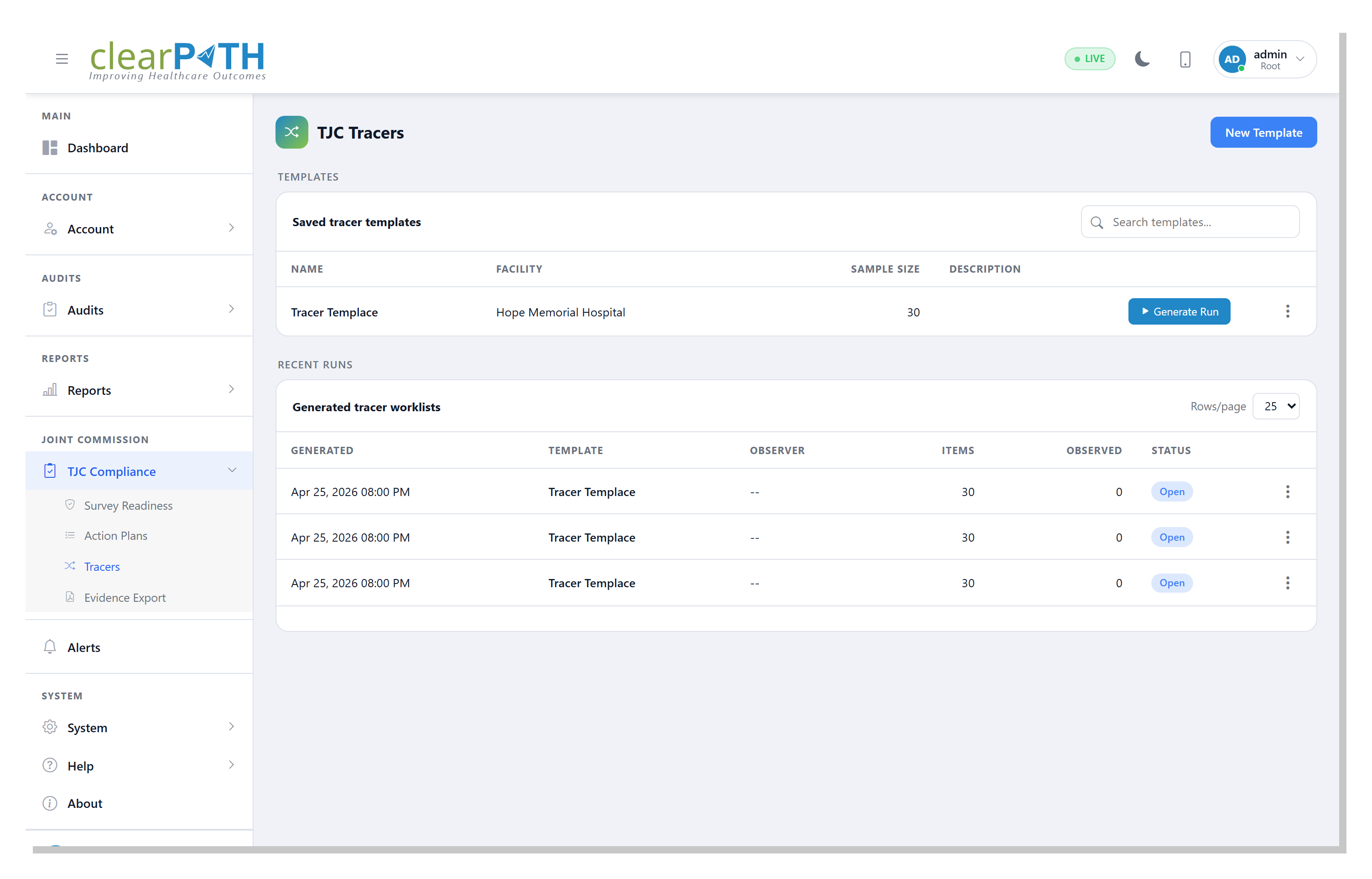
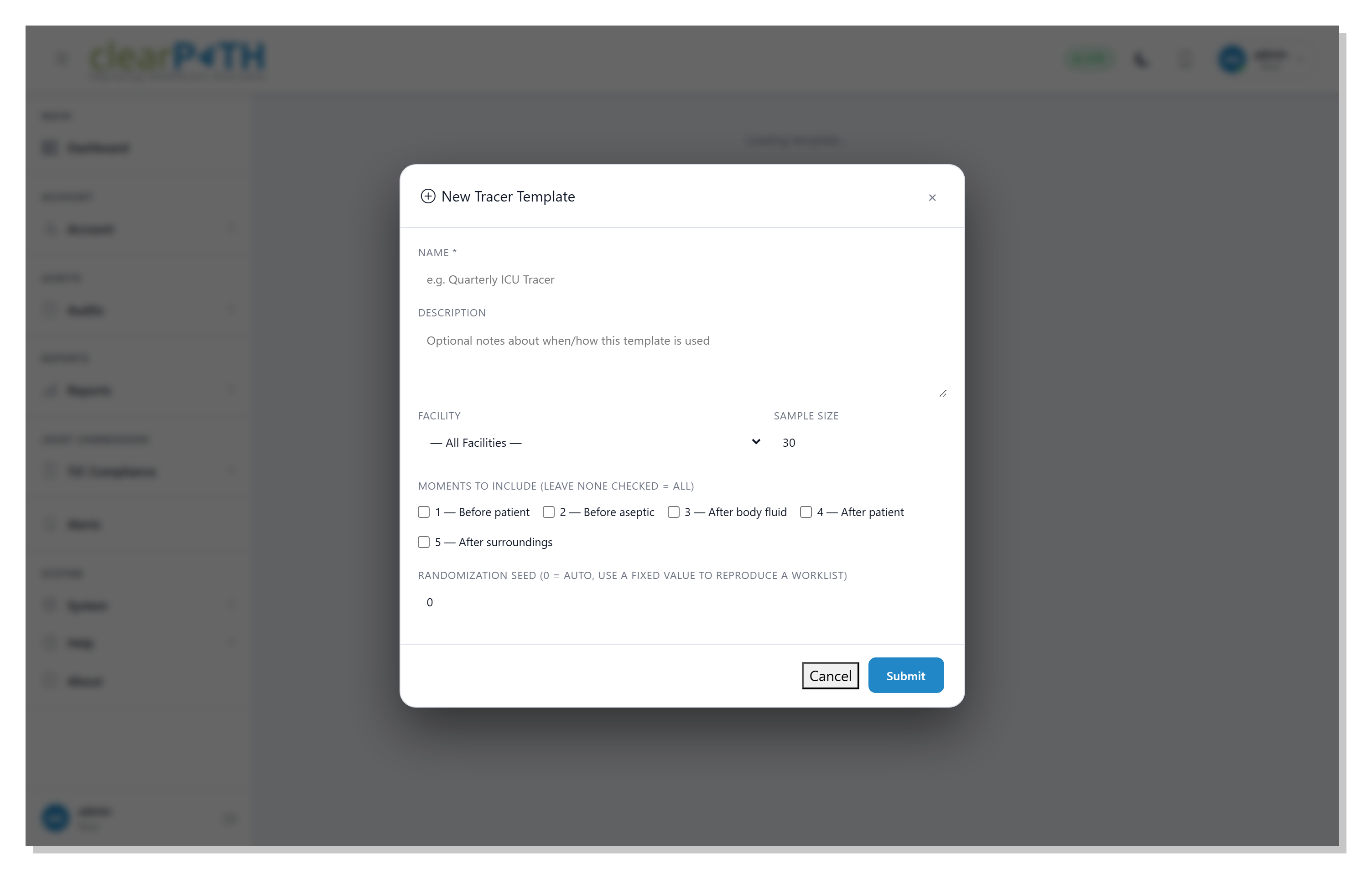
Tracer Subject Templates
Reusable tracer subject templates for the scenarios surveyors most often pick: high-risk medication paths, infection-control rounds, suicide-risk re-assessment for behavioral health, and post-fall investigations for LTC. Build once, run repeatedly to spot drift between surveys.
- Pre-built templates for acute, BH, and LTC scenarios
- Customise scope, evidence sources, and review checklist
- Re-run any template against the latest data window
- Side-by-side comparison across runs
Plus
TJC + CMS F-tag Template Library
Pre-built custom audits aligned to TJC Elements of Performance and CMS F-tags, organised in three packs: acute care, behavioral health, and long-term care. Standards tagging on every question lets reports filter by NPSG, EP, F-tag, or state-survey citation.
Sampling Adequacy Alerts
Configurable thresholds flag units with thin observation counts before a surveyor notices. Fix data gaps in the trailing 4 months, not the morning of the survey. Adequacy status surfaces inline on the readiness dashboard.
Survey Cycle Calendar
Enter your last survey date. clearPath projects the next survey window and reminds you about Focused Standards Assessment, Periodic Performance Review, and Evidence of Standards Compliance deadlines.
How It Maps to TJC Standards
- NPSG.07.01.01 — hand hygiene compliance with WHO/CDC guidelines: core platform capability, surfaced on the readiness dashboard.
- IC.02.01.01 / IC.02.02.01 — standard precautions, PPE, transmission-based precautions: tagged audit templates in the acute care pack.
- LD.03.04.01 / PI.01–03 — data-driven performance improvement: closed-loop PI action plans tied to threshold drops.
- Sustained improvement — 4+ months of compliance data above threshold: surfaced as a dedicated gauge on the readiness dashboard.
- Tracer methodology — observation-level data scoped by patient, unit, or window; pulls into the evidence packet on demand.
Built on the Platform You Already Use
Joint Commission Readiness doesn't introduce a parallel data store or a separate workflow. It's a layer of survey-prep tooling sitting on top of the same audit sessions, custom audits, dashboards, and security model your team uses every day.
- Time-stamped, observer-attributed audit trail per session
- WHO Five Moments + HCP type + technique + attributes per observation
- Custom audits for any compliance topic, with standards tagging
- Two-factor authentication, role-based permissions, LDAP / Active Directory
- FHIR R4 publish-out for BI and EHR integration
Built for the US Healthcare Segments You Operate In
Acute Care & AMCs
NPSG-focused hand hygiene, IC standard precautions, environmental rounds, medication storage. Auditor Groups roll units into programs of care so the readiness dashboard and evidence packets match the way infection prevention and quality teams actually operate.
Behavioral Health
The behavioral-health template pack ships with suicide risk re-assessment (NPSG.15.01.01), ligature-risk environmental scans, and restraint-use observation — same time-stamped, observer-attributed evidence trail as hand hygiene, same one-click evidence packet at survey time.
LTC / SNF and Critical Access
The LTC pack maps to CMS F-tags (F-880, F-684, F-689, F-755). Critical access customers draw from an essentials subset. Sampling adequacy alerts and the evidence packet generator do the work the accreditation coordinator doesn't have hours for.
See Joint Commission Readiness in Your Data
Show us your facility hierarchy and survey timeline; we'll walk you through what your readiness dashboard looks like and how the evidence packet would render for your last 12 months of compliance data.
Book a Walkthrough Talk to Support