In June we shipped the largest clearPath release we have ever built. Through the summer we watched how teams actually used the new platform, and this update answers what they asked for. It makes many audits easier to review together, puts a sign-off step on custom audits, makes Leapfrog evidence visible at a glance, trains observers inside the product, and makes integrations more dependable.
See Several Audits as One
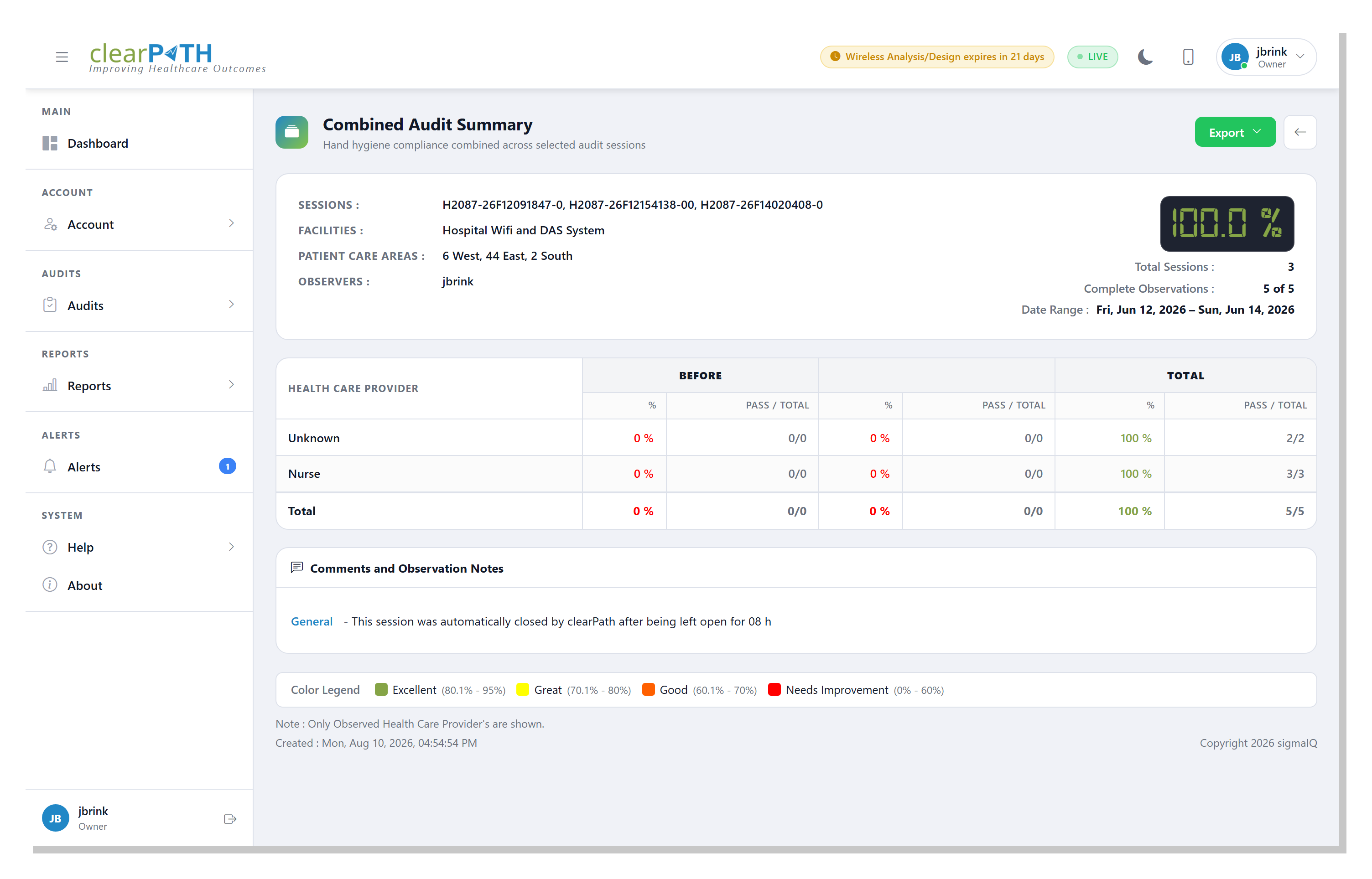
Direct observation produces many small sessions. One auditor might visit three units in a morning, or a blitz week might produce dozens of short sessions on the same floor. Until now, reviewing that work meant opening each session one at a time.
The new Combined Audit Summary fixes that. On the Sessions list, tick the sessions you want and click View Combined Summary. clearPath rolls them into a single report showing the combined compliance score, the full date range, every observer and unit involved, and the results for each health care provider type merged onto one line. Comments and Observation Notes from every session appear together. It is the fastest way to answer "how did this week's blitz actually go?"
We also added a safety net: deleting several sessions at once now asks you to confirm before anything is removed.
Custom Audits Get a Review Workflow
Custom audits now have their own Custom Audit Sessions list under the Audits menu. Every completed PPE, environmental services, medication safety, or other custom audit appears in one place, where reviewers can check scores, record an approve or reject decision, and start a new audit. For teams that need a supervisor to sign off on audit results before they count, that sign-off now lives inside clearPath, not in an email thread.
Leapfrog Evidence, Domain by Domain
Preparing for the Leapfrog Hospital Survey means proving more than a compliance rate. The Hand Hygiene Standard asks for evidence across several domains, including monitoring, feedback, training, infrastructure, and culture. The new Leapfrog Domain Evidence dashboard shows, domain by domain, which pieces of evidence your organization already has and which are still outstanding. You can see your gaps long before the submission deadline.
We also refined the per-moment dashboard gauges and the Moments Radar. Each moment is now numbered to match your account's moment method, so every gauge shows the correct name and target, whether you audit with four, five, or two moments.
Training Built Into the Platform (Preview)
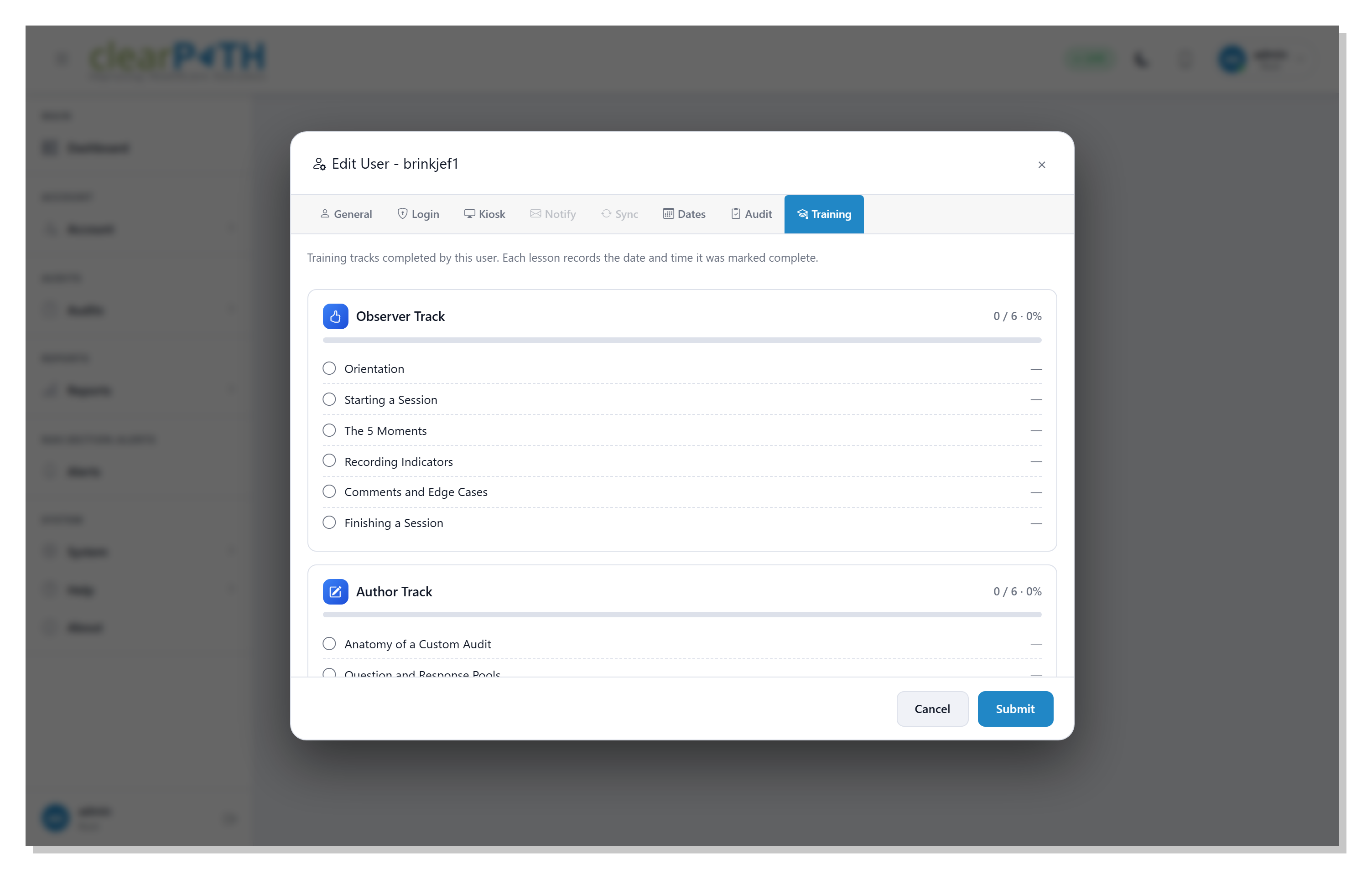
Reliable data starts with well-trained observers. The new Training module, available now as a preview, walks observers and audit authors through short, self-paced lessons inside clearPath itself. The Observer track covers orientation, starting a session, the five moments, recording indicators, edge cases, and finishing a session. The Author track covers how to design a strong custom audit.
clearPath records the date and time each user completes each lesson, so you have a ready answer when a surveyor asks how your auditors were trained. Administrators can build and adjust the lessons on the new Training Setup page. Training also pairs naturally with Inter-Rater Reliability: you can train observers first, then confirm that they agree.
Integration-Friendly XML Compliance Files
Many organizations feed clearPath's XML compliance files into a provincial scorecard, a data warehouse, or a quality system. This update makes those integrations simpler and more dependable:
- Two stable file names. _Current_Month.xml always holds the current month and updates as the month progresses. _Previous_Month.xml always holds the last completed month. An integration can fetch a fixed file name and never needs to calculate dates.
- Built-in audit trail. Every file now begins with a comment recording the account, the reporting period, and when the file was generated. Standard XML tools ignore it.
- A new XML Compliance Data page lets administrators browse, download, and remove the files generated for each reporting period, with no support ticket required.
- Correct readiness for file transfers. Distribution lists that deliver over SFTP or AS2 no longer show No-Go just because they have no email recipients. They are marked Go as soon as their reports are attached.
Heads-up for integration owners: the field-mapping file has been renamed to _Field_Mapping.xml. If an existing integration fetches the old file name, update it to the new one.
This post summarizes the clearPath Q3 2026 update. Existing customers can find the complete, linked change log in the What's New and Fixed section of the in-product help. Training is a preview feature.