What's New in clearPath: The Q2 2026 Release
This is the largest clearPath release we have ever shipped. It touches almost every corner of the product — a brand-new interface, a report you design yourself, smarter ways to plan and prove audit coverage, modern delivery and notification options, and a security posture built to satisfy the most cautious IT department. If you have been with us for a while, the software you sign in to today will look and feel meaningfully different. If you are new to clearPath, this is a good moment to take a fresh look.
Below is a guided tour of the highlights, grouped the way an infection prevention or quality team actually works: capture the data, plan the coverage, understand the results, distribute them, and keep the whole thing secure.
A Brand-New Interface, Top to Bottom
The entire web application has been rebuilt on a new responsive interface that adapts cleanly from a wall-mounted display down to a phone. It ships with both a light and a dark mode, and a dedicated desktop and mobile interface mode so the screen always matches the device in your hand.
It is also multilingual. clearPath now ships in five languages — English, Español, Français, Deutsch, and Nederlands — selectable at sign-in, as an account-wide default, or as a saved per-user preference, with browser-language auto-detection on a first visit. And time zone is now implemented end to end, so timestamps read correctly no matter where your facilities and your auditors are.
Auditing in the Field Got Easier
Direct observation only works if the tool in the auditor's hand stays out of the way. The cp2go apps for iOS, Android, and Windows have all been updated, and there is now a Progressive Web App (PWA) that runs in any modern browser, works with no network connection, and never needs to be downloaded from an app store — results upload automatically the moment the device reconnects.
Signing in is simpler, too. With the new device-code sign-in, the app shows a short code, an administrator approves the device from the new Auditing Devices page, and the app is signed in — with no username or password typed on a shared tablet. You can even type just your site id, like hope, and cp2go expands it to your full address. Administrators can also now upload legacy iScrub and Ministry of Health CSV files directly from the browser through the new Import Audits workspace, and every recorded session carries a step-by-step Transaction Log of exactly what the auditor did on the device.
Plan Coverage, and Prove It
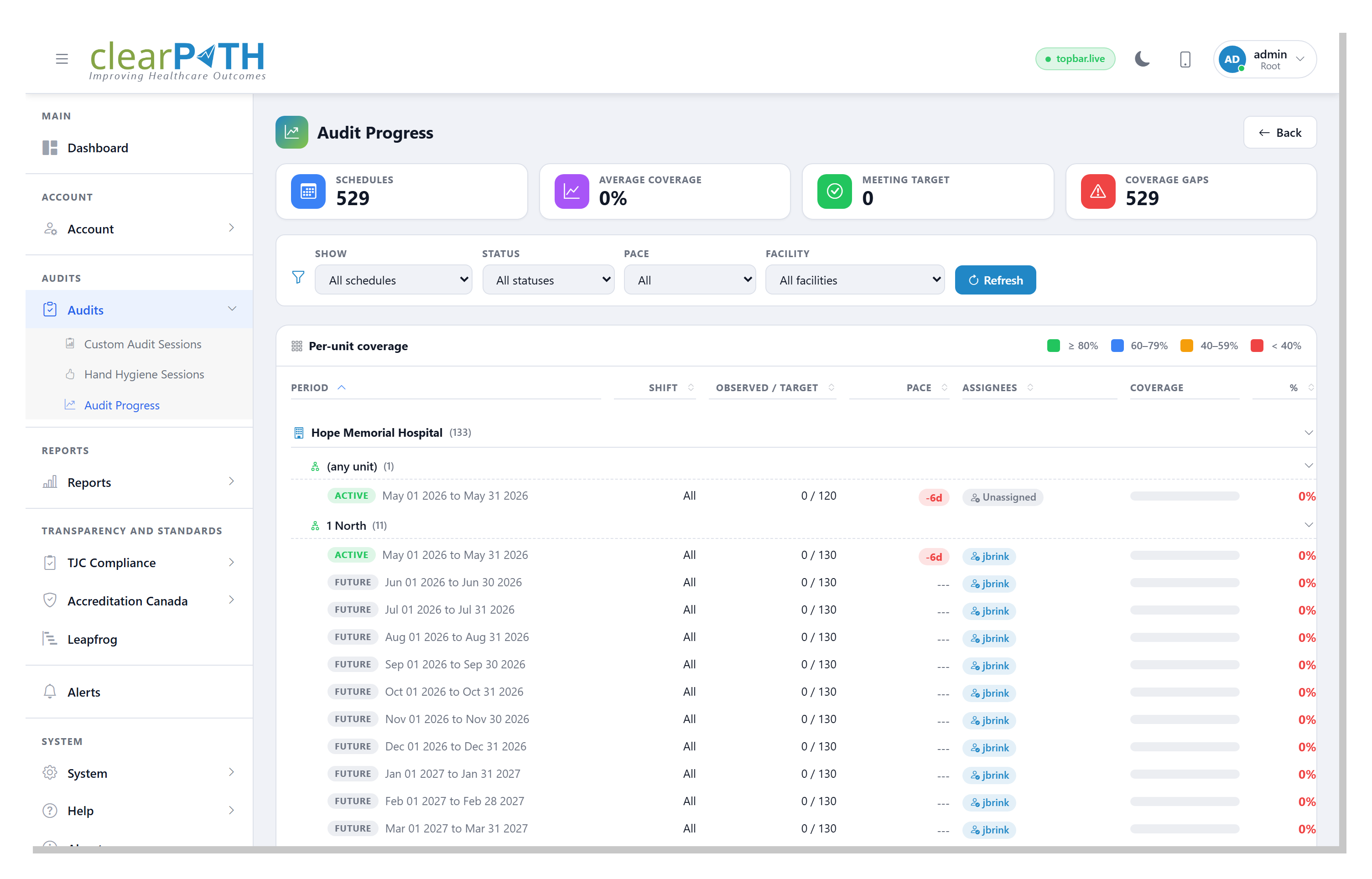
Knowing your compliance number is one thing. Knowing whether you collected enough observations, in the right units, to trust that number is another. This release adds a complete planning-and-coverage workflow.
- Scheduling plans observation coverage by facility, unit, shift, and period — including a one-click Build a Full Schedule tool that generates a year of monthly schedules sized to each unit's Leapfrog target.
- The Audit Progress heatmap shows real-time coverage versus target for every active schedule, with ahead/behind pace, color bands, and a My assignments filter so each observer sees exactly what is left on their plate.
- Inter-Rater Reliability lets you schedule co-observation windows, attach each rater's session, and compute a rate-agreement score with a per-moment breakdown — so auditor coaching targets the moments where observers actually disagree.
Custom Audits Grow Up Into Surveys
Custom audits can now do far more than replace a clipboard. Auditors can take pictures on mobile devices and attach them to an audit. Response pools support Net Promoter Score, and audits can carry follow-up flags that mark responses needing attention.
Most significantly, a custom audit can now be published as a public or private survey. New per-recipient Survey Invitations generate a tokenized URL for one named respondent, with an optional expiry date and single-use enforcement — so an outpatient, staff, or visitor survey can be attributed to a specific person and a link can never be shared or reused.
Reporting, Reimagined
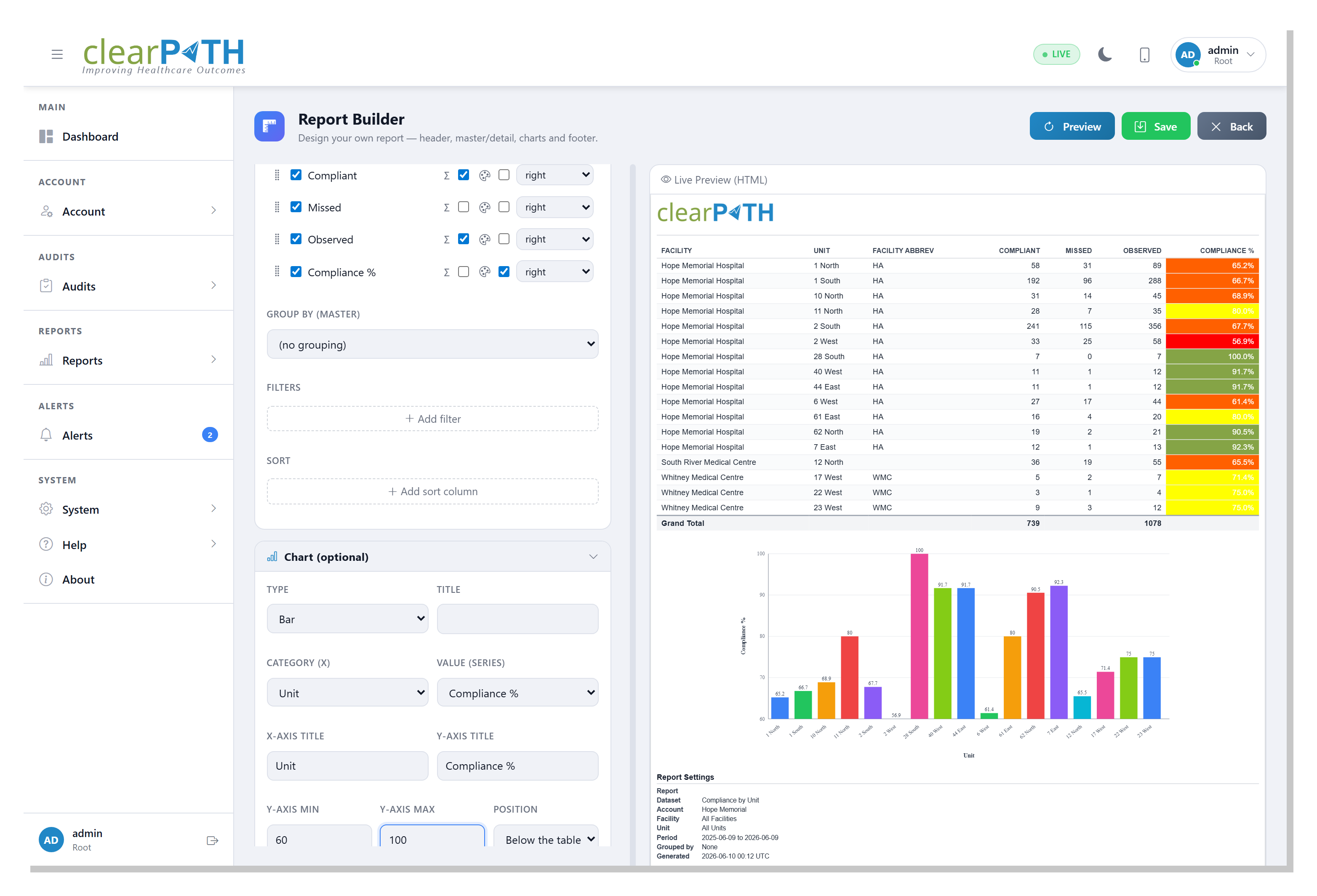
Reporting saw the deepest investment of the release. A new Excel engine produces native Excel charts, and most report styles can now be optimized for black-and-white printers. There are powerful new report types, including a Word Cloud, a P-Chart statistical-process-control report that separates real signals from statistical noise, a Pareto report that focuses effort on the categories driving the bulk of non-compliance, and a one-page HAI Cost-Avoidance / ROI report that translates your compliance lift into a defensible dollar figure.
The headline, though, is the new Report Builder (Ultimate edition). Design your own report: pick a dataset, choose and reorder the columns, filter and multi-column sort, add totals and group subtotals, color-code number columns to your account's ranges, drop in a chart, and lay out a header and footer — all with a live preview. It outputs to PDF, HTML, CSV, Excel, and Word, repeats the logo and headings on every page, and refreshes the moment you save it. More than a dozen datasets ship out of the box, from compliance and technique distribution to audit schedules, inter-rater reliability, and auditing devices.
Smarter, More Secure Distribution
Getting reports to the people who need them used to mean email and ZIP attachments. Now every distribution list has a Delivery Method picker: send by email, or push securely over FTPS, SFTP, SharePoint, WebDAV, or AS2 — the same schedule and bundling options, only the destination changes. A Test Connection button verifies credentials (and, for WebDAV, write permission) before the next scheduled run.
For recipients, the redesigned Shared Report Portal replaces inbox attachments entirely: recipients click a link, confirm their email, then pick exactly which PDFs to download from a branded, full-page list on your own domain. Behind the scenes, a Go/No-Go readiness check blocks a list from going out if any report is stale, an "Only Once" guarantee prevents duplicate sends, and lists can now ship XML compliance files alongside, or instead of, regular reports.
Notifications, Reminders, and Integrations
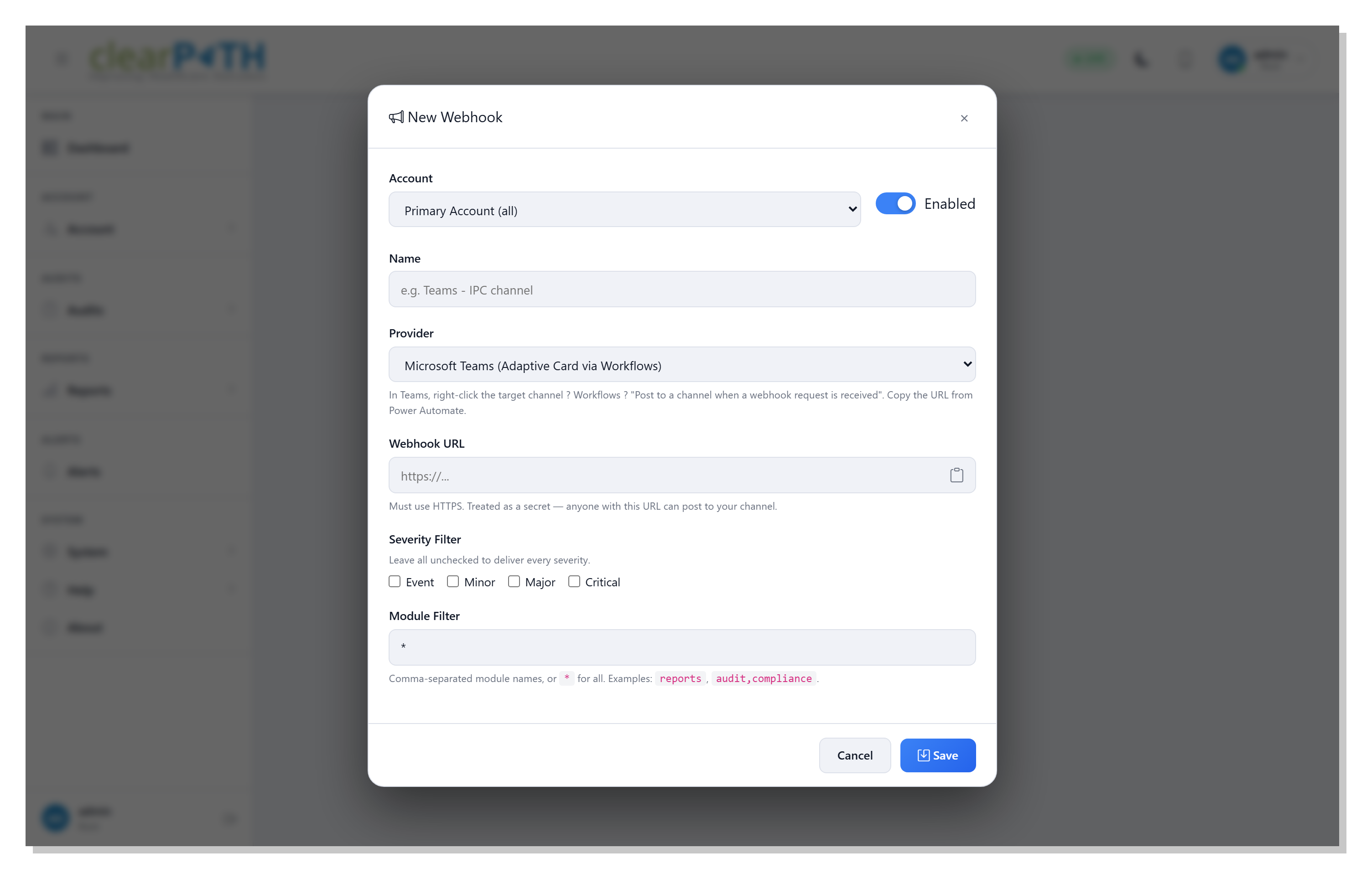
clearPath now reaches the channels your team already watches. The new Notifications framework pushes alerts, audit events, and distribution failures into Microsoft Teams, Slack, or any HTTPS endpoint that accepts JSON, with per-severity and per-module filters and a one-click Send test. On the standards side, clearPath now supports HL7 FHIR R4 for tighter integration with Epic, Cerner, and other health-record platforms.
The Reminders screen was redesigned and grouped into Hand Hygiene, Audit Scheduling, and Custom Audits categories — each with its own copy-to list. Audit Scheduling adds a missed-audit email, an observer weekly digest, and a coordinator weekly summary, so a unit that falls behind is caught early instead of at period end. And clearPath can now flag failed emails caused by bad addresses or staff who have left the organization.
Organize Your World: Regions, Floors, and Notes
Three new features help the data map onto the real world. Regions group facilities geographically — by continent, by LHIN, or any custom grouping — with optional GeoJSON boundaries drawn on the dashboard map. Floors and Floor Plans let you upload a floor-plan image, draw area polygons, calibrate a real-world scale, and overlay compliance results directly on the building layout. And Observation Notes give auditors a predefined dropdown of consistent comments — "dispenser empty on entry," "patient in isolation" — that surface in reports, on the session summary, and in a Notes Frequency dashboard widget.
A Live Dashboard Built for Decisions
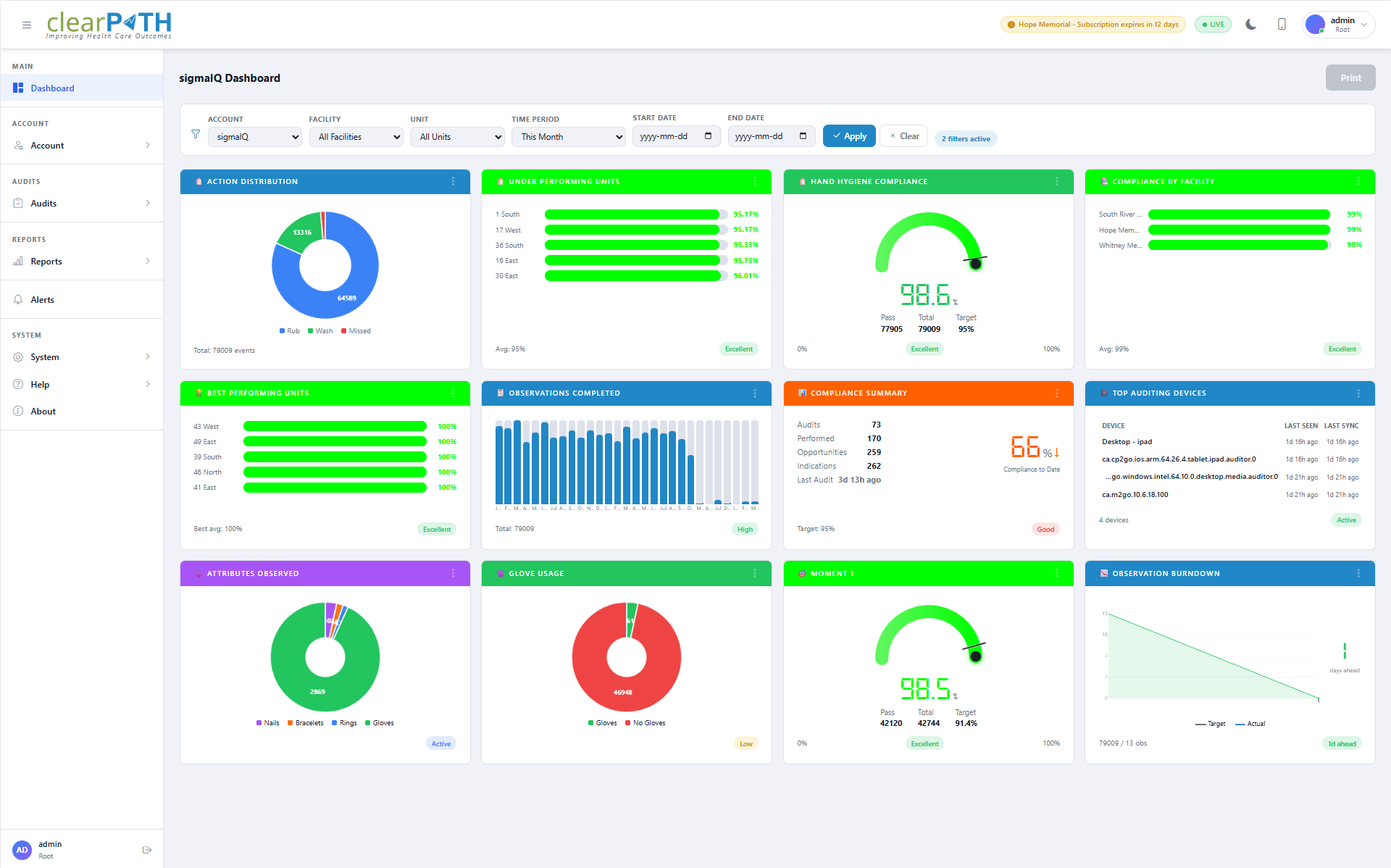
The dashboard was rebuilt from the ground up with drag-and-drop widgets and live data you can filter by facility, unit, and date range, then drill into for detail. There are widgets for each of the five moments, action distribution, glove usage, rub vs. wash, moments radar, best- and worst-performing units, and the four new ROI widgets — plus advanced statistical views including P-Charts, standard deviation, Pareto charts, cumulative sums, and funnel plots. Several widgets now open into full-page drill-downs with doughnut charts, summary cards, by-moment breakdowns, and a print-ready export.
Security and Survey Readiness
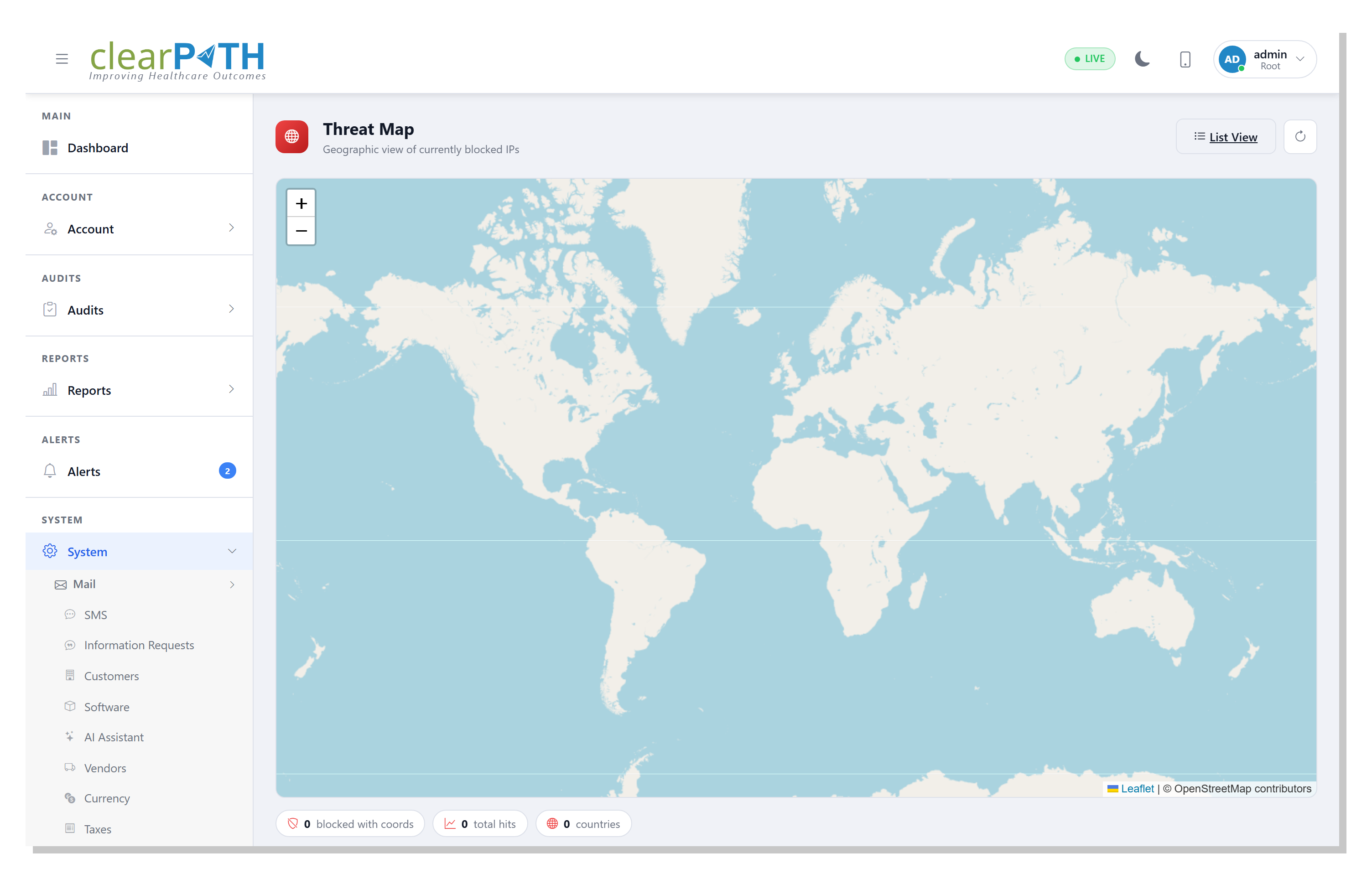
This release also hardened clearPath for the institutions that hold it to the highest bar. A new Security section covers ongoing penetration testing, request rate limiting, failed-login auto-blocking, a Blocked IPs list, and a geographic Threat Map. Two-factor authentication now offers a text-message (SMS) option alongside the authenticator app, and a new Active Alerts page gives administrators severity-filtered, acknowledgeable system alerts.
For teams heading into a survey, clearPath bundles dedicated readiness suites for The Joint Commission and Accreditation Canada, each with a readiness dashboard, action plans, tracer worklists, and a one-click evidence export. The Leapfrog Hand Hygiene Standard has been updated to the 2026 Survey, with account-wide and per-unit target settings. And Kiosk Mode plus a rebuilt Digital Signage engine put live results on shared screens, with token-based authentication you can revoke at any time.
See the New clearPath for Yourself
Every feature above is live today. Compare what each edition includes, or request a personalized walkthrough using your own facility structure.
Compare Editions Request for InformationThis post summarizes the Q2 2026 clearPath release. Existing customers can find the complete, linked change log — including every fix and smaller enhancement — in the What's New and Fixed section of the in-product help.